Capturing smooth, cinematic footage often relies on more than just a stable shot; precise focus control is equally vital. Imagine your subject drifting in and out of sharpness, ruining an otherwise perfect take. This common challenge can quickly transform dynamic camera movements into frustrating blurs. Fortunately, modern camera stabilizers, or gimbals, offer sophisticated ways to manage your lens’s focus, empowering you to maintain critical sharpness even while in motion. This guide will walk you through the essential steps and considerations for connecting your camera to your gimbal for impeccable focus control, ensuring your visuals always hit the mark.
What is Camera Stabilizer Focus Control and Why Do You Need It?
A camera stabilizer, often called a gimbal, is a device that uses motors to keep your camera level and steady, eliminating shakes and jitters from handheld footage. Focus control on a gimbal refers to the ability to adjust your lens’s focus directly through the gimbal’s controls, rather than manually on the lens itself. This capability is paramount for filmmakers and videographers for several key reasons.
Firstly, it ensures smooth focus pulls. Trying to adjust focus directly on the lens while operating a moving gimbal can introduce unwanted vibrations or jerky movements, undermining the very stability the gimbal provides. Remote focus control allows for subtle, precise adjustments, maintaining a professional look. Secondly, it enhances operational efficiency. With focus managed via the gimbal, you can keep your hands on the stabilizer, reacting instantly to changes in your shot without breaking your posture or interrupting your flow. Lastly, it unlocks creative possibilities, enabling dynamic focus shifts that follow subjects, transition between foreground and background, or create dramatic visual emphasis, all while keeping your camera perfectly steady.
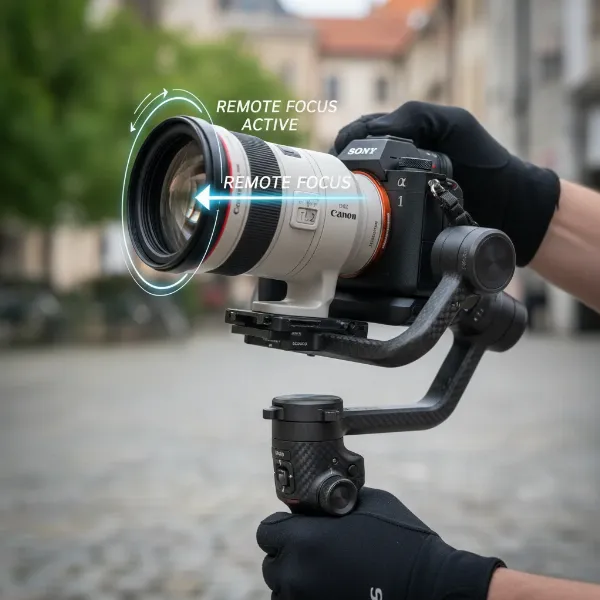 A professional camera mounted on a gimbal, illustrating remote focus control for smooth cinematic shots.
Methods for Achieving Focus Control with Your Gimbal
Connecting your camera to your gimbal for focus control can typically be achieved through two primary methods: direct electronic connection for compatible cameras and lenses, or the use of an external focus motor for mechanical control. The choice between these often depends on your specific camera and lens setup.
1. Direct Electronic Control (for compatible cameras/lenses)
Many modern mirrorless and DSLR cameras can communicate directly with gimbals via a control cable or Bluetooth. This method allows the gimbal to interface with your camera’s internal electronic focus system.
- Connectivity: This usually involves connecting a multi-camera control cable from your camera’s USB or multi-port to a designated camera control port on your gimbal. For some newer models, Bluetooth pairing can also enable basic controls like record start/stop and, in some cases, aperture, shutter speed, ISO, and even native electronic focus adjustments.
- Compatibility is Key: Not all cameras and lenses support electronic focus control through every gimbal. Always check your gimbal manufacturer’s compatibility list to ensure your specific camera and lens model can utilize this feature.
- Gimbal Settings: Once connected, you’ll typically navigate your gimbal’s menu or use its companion app to enable camera control and assign focus functionality to a dial or joystick.
2. External Focus Motor (for mechanical control)
For lenses without internal electronic focus that can be controlled by the gimbal, or for manual cinema lenses, an external focus motor is the standard solution. This motor physically turns the focus ring of your lens.
- Mechanism: The focus motor clamps onto a rod system mounted to your camera setup and drives a gear that engages with your lens’s focus ring. If your lens doesn’t have built-in gears, a flexible gear strip is attached to the focus ring to provide the necessary teeth for the motor to engage.
- Precision: External focus motors offer exceptional precision and are the go-to for professional focus pulling, providing tactile feedback and reliable, repeatable focus points.
- Power and Data: These motors typically draw power and receive control commands directly from the gimbal via a dedicated USB-C or proprietary cable.
Step-by-Step Guide: Connecting Your Camera and External Focus Motor
If your setup requires an external focus motor, follow these general steps to ensure a proper connection and optimal focus control. While specific models may vary, the underlying principles remain consistent.
1. Prepare Your Gimbal and Camera
Before anything else, ensure both your camera and gimbal are powered off. It’s also wise to check for and install the latest firmware updates for both devices, as this can enhance compatibility and unlock new features.
2. Mount the Camera onto the Gimbal
Carefully mount your camera onto the gimbal’s quick-release plate. Balance your camera thoroughly according to your gimbal’s instructions. Proper balancing is crucial for gimbal performance and prevents undue strain on the motors, including the focus motor.
3. Attach the 15mm Rod (if required)
Many focus motors require a 15mm rod to be mounted alongside your lens. If your gimbal setup or camera cage includes a rod mounting solution, attach a 15mm rod to it. Ensure it’s securely fastened and positioned correctly to align with your lens.
4. Apply the Focus Gear Strip to Your Lens
If your lens does not have integrated gear teeth on its focus ring, attach the provided flexible gear strip. Wrap it snugly around the lens’s focus ring, ensuring it’s straight and makes full contact. This is what the focus motor’s gear will engage with.
5. Mount the External Focus Motor
Slide the focus motor onto the 15mm rod. Position the motor so its small gear precisely aligns with the gear strip (or integrated gears) on your lens’s focus ring. Once aligned, tighten the motor’s clamp to secure it firmly in place. Ensure there’s good contact between the gears but avoid excessive tightness that could impede movement.
6. Connect the Focus Motor to the Gimbal
Using the appropriate USB-C or control cable, connect the focus motor to the designated motor control port on your gimbal. This port typically provides both power to the motor and allows the gimbal to send focus commands. For DJI gimbals, this port might be labeled “Motor Port” or “II”.
7. Connect Your Camera to the Gimbal (for additional controls)
For camera controls beyond just focus (like record start/stop, ISO, aperture), connect your camera to the gimbal using the recommended multi-camera control cable or pair via Bluetooth, if supported. Refer to your gimbal’s compatibility list and manual for the correct cable and connection procedure for your specific camera model.
8. Calibrate the Focus Motor
Calibration is essential for the gimbal to understand the full range of your lens’s focus throw.
- Power On: Power on your camera and gimbal.
- Access Calibration: On your gimbal’s touchscreen (if available), navigate to the motor settings. For DJI gimbals, you might swipe down from the home screen to enter the Control Center, tap the motor icon, and select “Focus Motor Calib.”
- Start Calibration: Tap “Confirm” or “Start Calibration.” The motor will automatically rotate the lens through its entire focus range to learn its end points.
- Troubleshooting: If the lens slips during calibration, gently hold it in place to assist the motor. Recalibrate if you change the motor’s position on the rod or use a different lens.
9. Configure Gimbal Dial Functions
After calibration, you’ll need to assign the focus control to a physical dial or joystick on your gimbal.
- Access Dial Settings: Swipe up from the bottom of the touchscreen on your gimbal’s home screen, or access the “Dial Functions” menu via the companion app.
- Assign Focus Motor: Select “Focus Motor” as the function for your gimbal’s front dial or other designated control. This will enable you to precisely adjust focus by turning the dial.
- FIZ Channels: Some advanced setups allow for controlling Focus, Iris (aperture), and Zoom (FIZ) via multiple motors. Ensure the motor is set to the correct “F” (Focus) mode if using a multi-purpose motor.
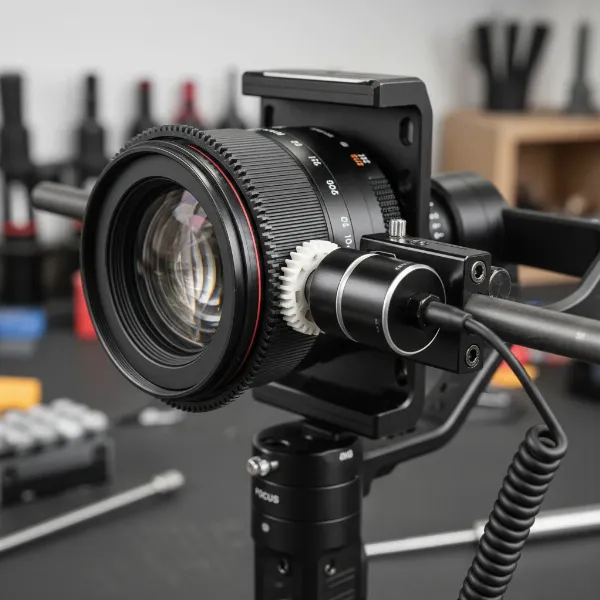 Close-up of an external follow focus motor connected to a camera lens on a gimbal setup.
Optimizing Your Focus Control Workflow
Beyond the initial setup, a few best practices can help you get the most out of your gimbal and focus control system.
Understand Your Lens
Be aware of your lens’s characteristics. Lenses with a longer focus throw offer more precise control, while those with a shorter throw might be more sensitive to adjustments. If you’re using lenses with varying focal lengths, you might need to recalibrate the focus motor when switching.
Practice Manual Focus Pulls
Even with an automated system, the art of focus pulling requires practice. Start with simple shots, focusing on a stationary object, then gradually move to tracking subjects. Learn to anticipate movement and adjust focus smoothly and naturally.
Utilize Gimbal Features
Many gimbals offer advanced features like A-B focus points, where you can set two specific focus distances and quickly transition between them. Some also integrate with advanced tracking systems (e.g., LiDAR on DJI RS models) for enhanced autofocus capabilities, even with manual lenses.
Monitor Your Focus
Always use a high-quality monitor, either built into your camera, an external field monitor, or a phone connected via a transmission system, to accurately judge your focus. Zooming in on the monitor can reveal subtle focus errors that might go unnoticed on a smaller screen.
Buying Guide: Expert Advice for Choosing Your Setup
Selecting the right components for gimbal focus control can seem daunting, but a clear understanding of your needs will guide your decision.
- Define Your Needs: Are you primarily shooting vlogs, action sports, professional narratives, or something else? Your purpose dictates the level of precision and robust features you’ll require. Casual users with autofocus lenses might suffice with basic electronic control, while professional filmmakers will likely need an external motor.
- Check Compatibility: This cannot be overstated. Before purchasing a gimbal or a focus motor, verify its compatibility with your existing camera and lenses. Consult the manufacturer’s official compatibility lists.
- Read Reviews and Compare Products: Look for real-world reviews and comparisons. Pay attention to feedback regarding ease of setup, calibration accuracy, motor responsiveness, and overall reliability.
- Consider Your Budget: Focus control solutions range from budget-friendly cables to high-end wireless follow focus systems. Balance features with your investment capacity, remembering that quality tools often pay dividends in workflow efficiency and shot quality.
- Warranty and Support: Invest in products from reputable brands that offer good customer support and warranty policies. Technical issues can arise, and reliable support is invaluable.
“Mastering focus on a gimbal transforms merely stable footage into truly cinematic storytelling. It’s the difference between a good shot and an unforgettable one.” – Admin, StabilizerPro.com, Camera Stabilizer Expert
Conclusion
Connecting your camera to your gimbal for focus control is a crucial step in elevating your videography to a professional level. Whether you achieve this through direct electronic communication with compatible lenses or by integrating an external focus motor for mechanical precision, the ability to control focus remotely allows for smoother, more deliberate adjustments and opens up a world of creative possibilities. By carefully following the setup procedures, calibrating your equipment, and practicing your technique, you can ensure every frame you capture is sharp, stable, and perfectly focused. Ready to dial in your perfect shot? What cinematic story will you tell with newfound precision?
Frequently Asked Questions
Can all cameras connect to gimbals for focus control?
No, not all cameras can connect to gimbals for focus control. Compatibility varies greatly by camera model, lens type, and gimbal brand. Always check the gimbal manufacturer’s official compatibility list to confirm which cameras and lenses support focus control, either directly or via an external motor.
Do I always need an external focus motor for focus control?
You only need an external focus motor if your camera and lens combination does not support electronic focus control directly through the gimbal, or if you are using manual cinema lenses. Many modern autofocus lenses can be controlled directly via a cable or Bluetooth if compatible with your gimbal.
How often should I calibrate my focus motor?
You should calibrate your focus motor whenever you change lenses, or if you adjust the mounting position of the motor on the rod system. Calibration ensures the motor accurately learns the lens’s focus throw, providing precise and reliable focus control.
What’s the difference between focus control and follow focus?
Focus control is the general ability to adjust focus remotely from your gimbal. Follow focus, whether manual or electronic, is a system that allows for precise and repeatable focus pulling, often referring to the act of smoothly changing focus during a shot to follow a moving subject or shift attention. An external focus motor setup facilitates electronic follow focus.
Can I control zoom and iris with my gimbal too?
Yes, many advanced gimbal setups and focus motors can control zoom and iris (aperture) in addition to focus. This usually requires additional motors (for FIZ – Focus, Iris, Zoom) and specific gimbal configurations, often assigned to different dials or joysticks on the stabilizer.