Have you ever wondered why your thermostat doesn’t kick on with every tiny temperature fluctuation, or why your gaming character moves smoothly without twitching erratically? The answer lies in two fundamental concepts in control and input systems: deadband and sensitivity. These settings are the unsung heroes behind smooth operation, precise control, and efficient performance across a myriad of applications, from intricate industrial machinery to the controllers in your hands. Mastering them is key to unlocking optimal functionality and user experience.
This guide will delve deep into the definitions, functions, and practical applications of deadband and sensitivity. We’ll explore why they are crucial, how they interact, and provide actionable advice to help you fine-tune these settings for your specific needs, ensuring everything from automated processes to competitive gaming is as responsive and stable as possible.
What are Deadband and Sensitivity? Why are they crucial?
At their core, deadband and sensitivity describe how a system responds to input or changes in its environment. While related, they address different aspects of a system’s reactivity and stability.
Deadband refers to a neutral zone or interval around a set-point value where a system will not react, even if the input signal deviates slightly. Imagine the steering wheel of a car; you can often turn it a small amount in either direction before the wheels actually begin to move. This “play” is a deadband. In a control system, it’s the permissible amount of change in a controlled parameter before the system initiates a corrective action. For example, a thermostat might have a deadband of 2 degrees Celsius. If the set temperature is 22°C, the heating won’t activate until the temperature drops below 20°C and won’t turn off until it rises above 24°C. This prevents constant on-off cycling, often called “hunting,” which can lead to inefficient operation and premature wear of components.
Sensitivity, on the other hand, describes how much a system’s output changes in response to a given input or disturbance. It quantifies the degree of responsiveness. A highly sensitive system will exhibit a large output change for a small input change, reacting quickly to even minor fluctuations. Conversely, a less sensitive system requires a more significant input change to produce a noticeable output. In industrial control, sensitivity measures how variations in system parameters affect the overall function. In gaming, it dictates how quickly your on-screen character moves or aims in response to a small movement of your joystick or mouse.
These two settings are crucial because they strike a delicate balance. Deadband promotes stability and efficiency by filtering out minor “noise” or insignificant fluctuations, protecting components from excessive cycling. Sensitivity, meanwhile, ensures that when a meaningful change occurs, the system responds effectively and precisely. Without deadband, a system might constantly react to minuscule inputs, leading to instability and rapid wear. Without adequate sensitivity, a system might be too sluggish, failing to respond promptly to necessary adjustments and potentially compromising performance or safety.
The Mechanics Behind Deadband and Sensitivity
Understanding how deadband and sensitivity operate internally reveals their profound impact on system behavior. It’s not just about simple on-off points but complex interactions.
Understanding Deadband’s Inner Workings
Deadband creates a zone of inaction, serving as a buffer against minor disturbances. Its mechanical or electronic implementation is designed to ignore inputs within a specified range, typically centered around a desired set-point or null position.
The primary causes of deadband in mechanical systems often include:
- Mechanical Backlash: This refers to the lost motion or “play” in interconnected mechanical parts, such as gears or linkages. Before any output motion can be transmitted, this slack must be taken up.
- Friction (Stiction): Static friction, or “stiction,” is the force required to initiate movement from a resting position. A certain amount of input force or signal must overcome this initial resistance before the component starts to move.
- Actuator and Positioner Insensitivity: In control valves, for instance, a sluggish or poorly calibrated positioner might not respond to very small changes in the control signal, effectively creating a deadband.
- Sensor Limitations: Even sensors have a minimum detectable change. Any fluctuation below this threshold won’t register, inherently introducing a form of deadband.
The consequences of improper deadband settings can be significant. If the deadband is set too small, the system becomes overly sensitive, leading to:
- Oscillation (Hunting): The system constantly overshoots and undershoots the target, wasting energy and causing instability.
- Excessive Wear: Components like motors, valves, or relays cycle on and off too frequently, shortening their lifespan.
- Reduced Energy Efficiency: Constant adjustments consume more power than necessary.
Conversely, a deadband set too large can result in:
- Delayed Response: The system takes too long to react to significant changes, leading to wider deviations from the set-point.
- Reduced Precision: In applications requiring tight control, a wide deadband can make it impossible to maintain variables within narrow tolerances.
- User Frustration: In interactive systems like gaming, a large deadzone can make controls feel unresponsive or “floaty.”
|
Our Picks for the Best Camera Stabilizer in 2026
As an Amazon Associate I earn from qualifying purchases.
|
||
| Num | Product | Action |
|---|---|---|
| 1 | DJI Osmo Mobile 8 Advanced Tracking Combo Gimbal Stabilizer for Phone, AI Native Tracking with Audio & Lighting, 360° Pan Rotation, Built-in Extension Rod & Tripod, 10h Battery, Extension Rod |

|
| 2 | Zeadio Video Action Stabilizing Handle Grip Handheld Stabilizer with Cold-Shoe Mount for All DSLR Camera Camcorder |
|
| 3 | FeiyuTech SCORP 2 Gimbal Stabilizer for DSLR and Mirrorless Camera, Integrated Al Tracking Sensor, 3-Axis Camera Stabilizer for Sony Canon Panasonic Nikon, 2.5kg Payload Touch Screen Vertical Shooting |
|
| 4 | DJI RS 3 Mini, 3-Axis Gimbal Stabilizer for Cameras Canon/Sony/Panasonic/Nikon/Fujifilm, 2 kg (4.4 lbs) Tested Payload, Camera Gimbal with Native Vertical Shooting, Black |
|
| 5 | ZHIYUN CINEPEER Weebill 3E [Official], 3-Axis Lightweight Gimbal Stabilizer for DSLR & Mirrorless Camera Canon/Sony/Panasonic/Nikon, 3KG Payload, Native Vertical Shooting, Bluetooth Shutter Control |
|
| 6 | DJI Osmo Mobile 7P Gimbal Stabilizer for iPhone, Android, Native Tracking, Lighting, 3-Axis Phone Gimbal, Quick Launch, One-Tap Edit, Built-in Extension Rod & Tripod, 10hrs Use, Phone Charging |
|
| 7 | FeiyuTech SCORP 3 Gimbal Stabilizer for Camera, Built-in AI Tracking Sensor & Detachable Remote Control, 3.5KG Payload Camera Stabilizer with Touch Screen, Vertical Shooting |
|
| 8 | Zeadio Camera Stabilizer Kit, All-in-One Handheld Stabilizer with LED Video Light, Microphone, Phone Holder & Action Camera adaper, Fits for All Camera, DSLR, Action Camera and All Smartphones |
|
| 9 | DJI Osmo Mobile 7 Gimbal Stabilizer for iPhone, Android, Built-in Tripod, Portable Stabilizer for iPhone, Selfie Stick, 3-Axis Phone Gimbal, ActiveTrack 7.0, One-Tap Edit, 10hrs Use, Phone Charging |
|
| 10 | 3-Shoe DSLR/Mirrorless/Action Camera Camcorder Phone Stabilizer Expansion Cage Mount Moviemaking Holder Rig YouTube Tiktok Vlogging Video Kit Compatible with GoPro Canon Nikon Sony iPhone Android |
|
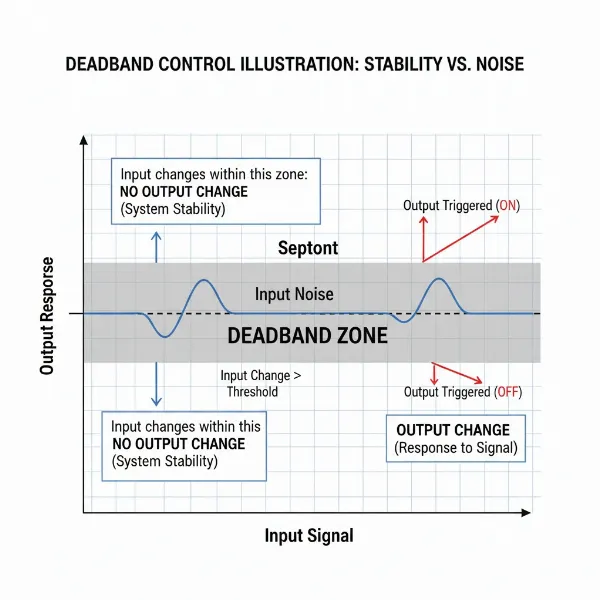 A diagram illustrating deadband in a control system, showing a central inactive zone around a setpoint with input signals and no output response within that zone.
The Dynamics of Sensitivity
Sensitivity, distinct from deadband, describes the system’s degree of response once the input exceeds any deadband. It’s about the magnitude of the reaction relative to the change.
Factors influencing sensitivity include:
- System Design: The inherent mechanical and electronic design of a system plays a major role. For instance, a small gear ratio might make a steering system highly sensitive.
- Sensor Quality and Range: High-resolution sensors can detect smaller changes, potentially allowing for higher sensitivity. However, this also means they are more susceptible to noise.
- Amplification and Gain: In electronic control loops, amplifier gain settings directly influence how much an input signal is amplified, thus affecting sensitivity.
- Software and Algorithms: Many modern systems allow sensitivity to be adjusted digitally through software, often by mapping input ranges to output curves.
The choice between high and low sensitivity involves trade-offs:
- High Sensitivity:
- Pros: Quick and precise responses to subtle inputs, crucial for tasks requiring fine control (e.g., surgical robots, competitive gaming aiming).
- Cons: Susceptible to noise and accidental inputs. Can make the system feel “twitchy” or unstable, leading to overcorrection. A highly sensitive control system’s output is greatly affected by disturbances.
- Low Sensitivity:
- Pros: Greater stability, less prone to overcorrection or reacting to minor disturbances. Good for systems where smooth, gradual changes are preferred (e.g., cruise control in a car). A less sensitive system’s output is not largely affected by disturbances.
- Cons: Slower response times, potentially feeling sluggish or unresponsive. May struggle to achieve fine adjustments.
Balancing these dynamics is essential for designing or configuring any system to perform optimally for its intended purpose.
Deadband vs. Sensitivity: A Comparative View
While both deadband and sensitivity settings are crucial for defining a system’s responsiveness, they play distinct roles. Understanding their differences is key to effective system tuning.
| Feature | Deadband | Sensitivity |
|---|---|---|
| Definition | A zone of input where no action or output occurs. | Degree of output change for a given input change. |
| Primary Purpose | Prevents unwanted responses, reduces cycling/wear, enhances stability. | Controls responsiveness, precision, and speed of reaction. |
| Effect on Input | Filters out small inputs below a threshold. | Scales the detected input into an output response. |
| Typical Impact | Larger Deadband: More stable, less responsive. Smaller Deadband: Less stable, more reactive (potentially overactive). | Higher Sensitivity: More reactive, less input needed for large output. Lower Sensitivity: Less reactive, more input needed for large output. |
| Analogy | The “play” in a steering wheel before wheels turn. | How sharply the wheels turn once the steering engages. |
| Where Applied | Often at the input stage, around a set-point or zero. | Can be applied across the entire input range, often after deadband filtering. |
| Goal | Avoid nuisance reactions and premature wear. | Achieve desired control fidelity and reaction speed. |
Practical Applications and Optimal Settings
Deadband and sensitivity settings are ubiquitous, appearing in everything from complex industrial processes to the devices we interact with daily. Their optimal configuration is highly context-dependent.
Industrial Control Systems
In industrial settings, precise control is paramount for efficiency, safety, and product quality. Deadband and sensitivity are critical for managing process variables like temperature, pressure, flow, and motor speed.
- HVAC Systems: As seen with thermostats, a deadband prevents heating or cooling systems from cycling on and off constantly due to minor temperature swings. An optimal deadband saves energy by allowing the temperature to drift slightly within an acceptable range, reducing wear on compressors and furnaces.
- Expert Tip: “For most commercial HVAC applications, a deadband of 1-3°C (2-5°F) is a good starting point. Wider settings can save energy, but too wide may impact occupant comfort.” – Dr. Elena Rodriguez, Industrial Control Systems Engineer
- Pressure and Flow Control: In pipelines or manufacturing processes, maintaining stable pressure or flow rates is vital. Deadband prevents control valves from continuously adjusting for negligible fluctuations, which could introduce instability and wear on the valve. Sensitivity ensures that when a significant deviation occurs, the valve responds adequately to restore the desired condition.
- Motor Speed Control: Deadband can prevent motors from constantly adjusting for minor load variations, extending motor lifespan and improving overall system stability.
- Sensor Monitoring: Alarms for critical parameters (e.g., high temperature, low pressure) often incorporate deadband to avoid false alarms triggered by momentary sensor noise. Recommended deadband ranges vary significantly by parameter; for example, 1-3% of the total range for electrical current and voltage, or 0.1-0.5 pH units for chemical parameters.
Gaming Controllers and User Interfaces
For gamers, deadband (often called “deadzone”) and sensitivity directly influence the feel and precision of their input devices.
- Joystick Deadzone: Analog joysticks can suffer from “stick drift,” where a small input is registered even when the stick is centered. A deadzone setting defines how far the joystick must be moved from its center position before any input is registered by the game.
- Lower Deadzone: Allows for incredibly fine, immediate movements, preferred by professional players with precise control. However, it makes stick drift more noticeable.
- Higher Deadzone: Masks stick drift and makes controls less twitchy, but sacrifices responsiveness for small inputs.
- Aim and Look Sensitivity: This determines how quickly your crosshair or camera moves in response to joystick or mouse input.
- Higher Sensitivity: Faster turning and aiming, allowing for quick reactions, especially in fast-paced shooters. Requires very fine motor control.
- Lower Sensitivity: Slower, more controlled movements, often preferred for precise aiming or when tracking targets.
- Finding Optimal Settings: Gamers typically find their optimal settings through extensive trial and error, adjusting based on game type, personal preference, and controller condition. Many pros recommend starting with moderate settings (e.g., 5-5 or 6-6 sensitivity in shooters) and adjusting incrementally.
 A close-up of a gaming controller with overlaid UI elements showing adjustable deadzone and sensitivity sliders, indicating precise control settings for gameplay.
Other Applications: Camera Stabilizers/Gimbals
Even in professional filmmaking, deadband plays a crucial role. Camera stabilizers, or gimbals, use motors to keep a camera steady.
- Gimbal Deadband: Setting a deadband on a gimbal means that small, unintentional movements of the operator’s hands are ignored by the motors. This results in smoother, more cinematic footage, as the camera only reacts to deliberate, larger movements. If the deadband is too low, the gimbal might be overly sensitive to every tiny tremor, leading to jerky footage. Adjusting deadband for each motor via a companion app is common.
Fine-Tuning Your Settings: Expert Advice
Optimizing deadband and sensitivity is rarely a one-size-fits-all solution. It requires a methodical approach and an understanding of your system’s specific context.
- Understand Your System’s Purpose: What is the primary goal? Is it maximum stability, pinpoint precision, rapid response, or energy efficiency? The answer will guide your adjustments. For example, a nuclear reactor’s control system will prioritize stability and safety over instant reaction to minor fluctuations, whereas a fighter jet’s flight controls demand extreme sensitivity.
- Start with Defaults or Recommendations: Many systems come with factory default settings or community-recommended ranges. These are good starting points before you begin personalizing. For industrial applications, consulting engineering specifications is crucial.
- Adjust Incrementally: Make small changes to one setting at a time, then test the system thoroughly. Drastic changes can make it difficult to identify the impact of each adjustment.
- Observe and Analyze: Pay close attention to how the system behaves after each change.
- For deadband: Is it still over-cycling? Is it becoming too sluggish?
- For sensitivity: Are you overshooting your targets? Are movements too slow?
- Consider the Trade-offs: Remember that increasing one aspect often means sacrificing another. A tighter deadband might offer more immediate reaction but could lead to instability. Higher sensitivity might provide faster movements but reduce control accuracy. Finding the “sweet spot” is about achieving an acceptable balance for your application.
- Calibrate Regularly: Over time, mechanical components can wear, or sensor accuracy might drift. Regular calibration helps ensure your settings remain effective. For gaming controllers, this might mean adjusting your deadzone as stick drift naturally develops.
- Document Your Settings: Keep a record of your settings, especially if you experiment frequently. This allows you to revert to a known good configuration or recreate a successful setup.
Troubleshooting Common Issues
Even with a good understanding, you might encounter issues. Here’s how to troubleshoot some common problems related to deadband and sensitivity.
- Excessive Chatter or Oscillation: If a control system (e.g., a pump, fan, or thermostat) is turning on and off too frequently, or a robotic arm is twitching, your deadband might be too small, or your sensitivity too high.
- Solution: Gradually increase the deadband setting to create a wider zone of inaction. If that doesn’t resolve it, slightly decrease the sensitivity.
- Lag or Unresponsiveness: If your system feels slow to react, or a gaming character’s movements are delayed, your deadband might be too large, or your sensitivity too low.
- Solution: Experiment with decreasing the deadband to allow earlier responses. Simultaneously, try increasing the sensitivity for quicker reactions.
- “Stick Drift” in Gaming Controllers: If your character or camera moves without you touching the joystick, the controller is experiencing stick drift. Your deadzone is likely set too low to compensate for this minor input.
- Solution: Increase your joystick deadzone setting incrementally until the unwanted input ceases. Be mindful that too high a deadzone will make fine movements harder.
- Overcorrection: In control systems, if the output frequently overshoots the target and then corrects back, your sensitivity might be too high, causing an aggressive reaction to deviations.
- Solution: Reduce the sensitivity slightly to allow for more gradual and controlled adjustments. This might also involve adjusting proportional, integral, and derivative (PID) control parameters if applicable.
Key Considerations for Setting Deadband and Sensitivity
When configuring deadband and sensitivity, remember that context is king. There’s no universal “best” setting; it’s always about tailoring these parameters to your specific system and its operational environment.
- Define Your Tolerance: What is the acceptable range of deviation for your system? For temperature control, a few degrees might be fine, but for a precision cutting tool, even a fraction of a millimeter is unacceptable.
- Assess System Dynamics: Does your system respond quickly or slowly? Is it prone to external disturbances or noise? A naturally stable system might tolerate a smaller deadband or higher sensitivity.
- Consider User Skill: In manual control systems (like gaming or driving), a user’s skill level and preference heavily influence optimal sensitivity. Beginners often prefer lower sensitivity, while experts might opt for higher settings for faster reaction times.
- Prioritize Longevity and Efficiency: For industrial machinery, deadband plays a vital role in reducing wear and tear, and optimizing energy consumption. Sacrificing a tiny bit of immediate precision for greater component lifespan can be a wise trade-off.
- Test in Real-World Conditions: Simulated environments can only get you so far. Always test and refine your settings under actual operating conditions to account for real-world variables.
Conclusion
Deadband and sensitivity are foundational elements in achieving effective control and smooth operation across diverse systems. Deadband provides a crucial buffer, preventing over-reaction to minor fluctuations, thereby enhancing stability, efficiency, and component longevity. Sensitivity, conversely, dictates the responsiveness and precision of a system, ensuring that meaningful inputs trigger appropriate and timely actions.
Mastering these settings is not about finding a single perfect value, but rather understanding their interplay and adjusting them intelligently based on the specific application, desired performance, and inherent system characteristics. Whether you’re configuring an industrial process, tuning your gaming controller, or optimizing a Camera Stabilizer, a thoughtful approach to deadband and sensitivity will lead to more stable, efficient, and enjoyable results. What aspect of your daily life could benefit from a better understanding of these subtle yet powerful control mechanisms?
Frequently Asked Questions
What is the difference between deadband and hysteresis?
Deadband refers to a range of input values where no output change occurs. Hysteresis, while related, describes a system’s output depending not only on its current input but also on its past inputs. It means the path taken to reach a particular state differs depending on whether the input is increasing or decreasing, resulting in a “lag” or different response curves.
Can deadband and sensitivity be adjusted in all systems?
While the concepts apply broadly, the ability to adjust them depends on the system’s design. Many modern digital control systems, industrial controllers, and gaming platforms offer adjustable deadband and sensitivity settings. Older or simpler mechanical systems might have fixed deadbands due to their physical construction.
How does deadband affect energy consumption?
A properly set deadband can significantly reduce energy consumption by preventing constant cycling of equipment (e.g., HVAC systems, pumps, motors). By allowing the controlled variable to drift within an acceptable range before correction, the system avoids frequent startups and shutdowns, which are often the most energy-intensive operations.
What happens if sensitivity is too high in a control system?
If sensitivity is too high, the control system will react aggressively to even tiny deviations or noise, leading to instability, oscillations (hunting), and potentially overshooting the desired set-point. This can cause rapid wear on actuators, increase energy usage, and lead to poor control quality or even unsafe conditions.
Is a lower deadzone always better for gaming?
Not necessarily. While a lower deadzone offers more immediate and precise input, it can make unwanted “stick drift” (where the joystick registers input when centered) much more noticeable. Players often adjust their deadzone to the lowest possible setting that eliminates stick drift on their specific controller, balancing responsiveness with unwanted inputs.