In today’s fast-paced digital world, capturing stunning video footage directly from your smartphone has become a powerful tool for creators. But how do you move beyond static shots to truly professional-looking, dynamic content? The answer often lies in motion control. That’s where the Joby Spin and Swing come into play, offering ingenious solutions to bring cinematic movement to your mobile productions. This review delves into these compact, motorized devices, exploring their features, performance, and whether they are the right fit to transform your smartphone filmmaking.
What are the Joby Spin and Swing? Why Do You Need Motion Control for Phones?
The Joby Spin and Swing are innovative accessories designed to add controlled, motorized movement to your smartphone videography. They empower creators to capture smooth, dynamic shots that static tripods or handheld filming simply can’t achieve.
The Joby Spin is a compact, 360-degree motorized panning head. It’s engineered to create captivating rotational movements, perfect for stunning timelapses, sweeping panoramic stills, and engaging b-roll video that elegantly transitions across a scene. On the other hand, the Joby Swing functions as a portable electronic slider. It enables precise linear tracking motions, allowing you to smoothly glide your smartphone horizontally or vertically, adding a sense of depth and professionalism to product reveals or establishing shots. Both devices connect seamlessly to your smartphone via the Joby Motion app, putting sophisticated motion control directly at your fingertips. The benefit of using these camera stabilizers is evident: they significantly enhance video quality by eliminating shaky footage, providing smooth camera movements that captivate viewers and lend a polished, professional aesthetic to any project, from travel vlogs to short films.
Key Features and Specifications of Joby Spin and Swing
Both the Joby Spin and Swing are built with portability and performance in mind, offering a range of features designed to enhance your mobile content creation.
Joby Spin: The Panning Powerhouse
|
Our Picks for the Best Camera Stabilizer in 2026
As an Amazon Associate I earn from qualifying purchases.
|
||
| Num | Product | Action |
|---|---|---|
| 1 | Zeadio Video Action Stabilizing Handle Grip Handheld Stabilizer with Cold-Shoe Mount for All DSLR Camera Camcorder |

|
| 2 | ZHIYUN CINEPEER Weebill 3E [Official], 3-Axis Lightweight Gimbal Stabilizer for DSLR & Mirrorless Camera Canon/Sony/Panasonic/Nikon, 3KG Payload, Native Vertical Shooting, Bluetooth Shutter Control |
|
| 3 | DJI RS 3 Mini, 3-Axis Gimbal Stabilizer for Cameras Canon/Sony/Panasonic/Nikon/Fujifilm, 2 kg (4.4 lbs) Tested Payload, Camera Gimbal with Native Vertical Shooting, Black |
|
| 4 | Zeadio Camera Stabilizer Kit, All-in-One Handheld Stabilizer with LED Video Light, Microphone, Phone Holder & Action Camera adaper, Fits for All Camera, DSLR, Action Camera and All Smartphones |
|
| 5 | FeiyuTech SCORP 2 Gimbal Stabilizer for DSLR and Mirrorless Camera, Integrated Al Tracking Sensor, 3-Axis Camera Stabilizer for Sony Canon Panasonic Nikon, 2.5kg Payload Touch Screen Vertical Shooting |
|
| 6 | FeiyuTech SCORP 3 Gimbal Stabilizer for Camera, Built-in AI Tracking Sensor & Detachable Remote Control, 3.5KG Payload Camera Stabilizer with Touch Screen, Vertical Shooting |
|
| 7 | DJI Osmo Mobile 8 Advanced Tracking Combo Gimbal Stabilizer for Phone, AI Native Tracking with Audio & Lighting, 360° Pan Rotation, Built-in Extension Rod & Tripod, 10h Battery, Extension Rod |
|
| 8 | DJI Osmo Mobile 7 Gimbal Stabilizer for iPhone, Android, Built-in Tripod, Portable Stabilizer for iPhone, Selfie Stick, 3-Axis Phone Gimbal, ActiveTrack 7.0, One-Tap Edit, 10hrs Use, Phone Charging |
|
| 9 | 3-Shoe DSLR/Mirrorless/Action Camera Camcorder Phone Stabilizer Expansion Cage Mount Moviemaking Holder Rig YouTube Tiktok Vlogging Video Kit Compatible with GoPro Canon Nikon Sony iPhone Android |
|
| 10 | DJI Osmo Mobile 7P Gimbal Stabilizer for iPhone, Android, Native Tracking, Lighting, 3-Axis Phone Gimbal, Quick Launch, One-Tap Edit, Built-in Extension Rod & Tripod, 10hrs Use, Phone Charging |
|
The Joby Spin is a master of rotation, capable of a full 360-degree pan. It supports smartphones weighing up to 750g (1.7lb), making it compatible with most modern devices. Powered by a built-in lithium battery, it provides approximately 3 hours of continuous shooting for both video and timelapse, with a quick 2.5-hour charging time via USB-C. Connectivity is handled through Bluetooth 5.1, allowing for seamless control via the Joby Motion app. Its compact dimensions (7.2 x 7.2 x 4.3 cm) and lightweight build (0.13 kg) ensure it’s incredibly travel-friendly. For advanced users, two Spin units can be combined with a separate Pan Tilt Bracket to achieve dual-axis pan and tilt movements, opening up even more creative possibilities.
Joby Swing: The Compact Slider
The Joby Swing specializes in linear tracking, mimicking the smooth motion of a traditional camera slider in a much smaller form factor. Like the Spin, it connects wirelessly using Bluetooth 5.1 and is operated through the intuitive Joby Motion app. Designed specifically for smartphones, it provides controlled horizontal or vertical glides, perfect for adding subtle yet impactful movement to your shots. Its electronic motor ensures consistent speed and smooth acceleration/deceleration, bringing a professional touch to your mobile videos.
The Joby Motion App: Your Creative Command Center
At the heart of both devices is the Joby Motion app, compatible with iOS 12+ and Android 8.0+. This robust application allows you to:
- Set Start and End Points: Define precise beginning and ending positions for your movements.
- Adjust Speed and Delay: Fine-tune the speed of your pans or slides and set recording delays.
- Timelapse Presets: Utilize convenient one-tap presets for common timelapse scenarios like clouds, people, or traffic.
- Integrated Editing: Perform quick edits and effortlessly share your creations to your favorite social media platforms.
The app’s interface adapts slightly depending on whether you’re controlling the Spin or the Swing, offering optimized controls for each device’s unique motion capabilities.
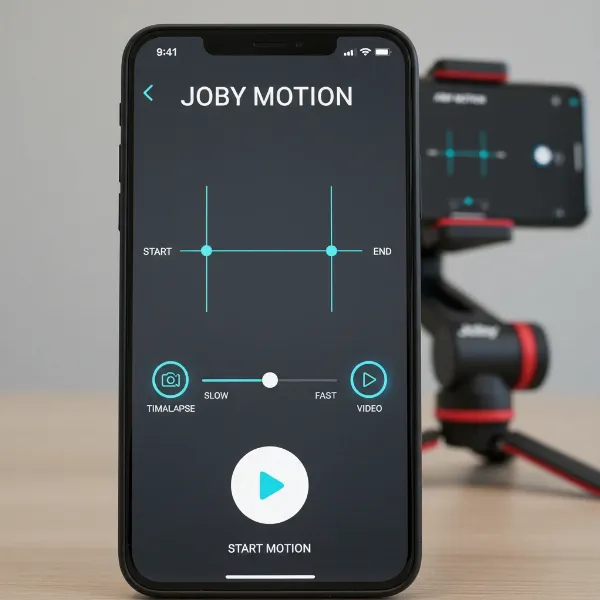 A smartphone displaying the Joby Motion app interface, showing controls for setting start/end points for the Joby Spin and Swing motion control devices.
A Closer Look: Performance and User Experience
Understanding how the Joby Spin and Swing perform in real-world scenarios is crucial for any content creator considering these tools. Their effectiveness often comes down to ease of use, motion quality, and handling any limitations.
Ease of Setup and App Interface
Getting started with the Joby Spin and Swing is remarkably straightforward. Both devices boast simple Bluetooth pairing, connecting to your smartphone with just a few taps through the Joby Motion app. While initial reviews sometimes highlighted app-related issues, recent experiences suggest that once you overcome a slight learning curve, the app becomes quite user-friendly. For the Spin, intuitive swipe gestures control the panning direction, allowing you to easily set in-points and out-points for your desired motion. The Swing also offers clear controls, often relying on press-and-hold icons for defining tracking paths. The app’s clear layout and specific modes for video, timelapse, and panorama (for Spin) help streamline the creative process, though familiarization with its nuances is recommended.
Motion Smoothness and Precision
The core promise of motion control is smooth footage, and both devices generally deliver. The Joby Spin excels at consistent, fluid panning. It accurately follows your programmed path, creating dynamic shots and timelapses that can significantly elevate your content. The easing in and out of pans adds a professional touch, avoiding abrupt starts and stops. The Joby Swing, designed for linear tracking, also produces satisfyingly smooth glides. However, some users have noted occasional stuttering in the Swing’s motion, which can be noticeable in the final footage. This is often mitigated by ensuring the device is on an exceptionally stable surface and potentially weighing down the tripod it’s mounted on. Overall, when used correctly, these tools can achieve impressive, professional-looking motion that is difficult to replicate handheld.
Battery Life and Portability
Both the Spin and Swing are designed for creators on the go. Their compact, pocket-friendly sizes make them ideal companions for travel, vlogging, or any shoot where minimizing gear is key. The Spin, weighing a mere 0.13 kg, is particularly easy to slip into any bag. With a 3-hour battery life for both video and timelapse, they offer ample power for typical shooting sessions. The USB-C charging ensures quick replenishment, taking only 2.5 hours to reach full charge, meaning you can spend more time creating and less time waiting.
Limitations and Workarounds
Despite their strengths, the Joby Spin and Swing do present a few considerations. Early criticisms of the Joby Motion app have largely been addressed, though mastering its features still requires some dedicated practice. A specific niggle for the Joby Spin involves the supplied GripTight PRO phone mount: when attached in a way that allows interaction with the app screen, it can restrict the smartphone’s ability to tilt upwards. This can be problematic for timelapses requiring an upward angle to capture clouds or tall structures. A simple workaround is to use a separate ball head (like the Joby Ballhead 1K, often included with the Swing kit) mounted between the Spin and the phone, which restores full tilt flexibility. The Spin’s panorama mode, which was in beta, has also been noted for sometimes producing noticeable joins in stitched stills; using your phone’s native pano mode might yield better results. For the Joby Swing, stability is key to avoid stutters, and a sturdy tripod is essential. While both devices can be controlled via the same app, it’s advisable to close and reopen the app when switching between the Spin and Swing to prevent connectivity confusion.
Comparing Joby Spin and Swing: Which One is Right for You?
Deciding between the Joby Spin and Swing often depends on the specific types of motion you aim to achieve in your smartphone videos. Both offer distinct functionalities that cater to different creative needs.
| Feature | Joby Spin (Panning Head) | Joby Swing (Slider) |
|---|---|---|
| Motion Type | 360° Panning, Rotational | Linear Tracking (Slider-like) |
| Primary Use Cases | Timelapses, Panoramic Stills, Sweeping B-roll | Short Tracking Shots, Product Reveals, Establishing Shots |
| Key Advantage | More versatile for dynamic, noticeable motion; 360° capability | Creates smooth, precise horizontal or vertical glides |
| Known Issues | Potential limited upward tilt with standard mount (solvable) | Occasional motion stuttering; requires a very stable base |
| Combinability | Can combine two Spins with a Pan Tilt Bracket for dual-axis (pan-tilt) motion | Can combine with Spin for advanced pan-tilt-slide (requires additional accessories) |
| Recommendation | Often recommended if you can only purchase one device due to its more impactful motion. | Best for specific linear motion needs; complements the Spin for diverse shots. |
Many content creators find the Joby Spin’s rotational capabilities more universally appealing for adding a dramatic flair to timelapses and b-roll. If your goal is to create sweeping vistas or introduce dynamic camera movement around a subject, the Spin is likely your go-to. The Swing, while excellent for linear movements, might appeal more to those who frequently shoot product reviews or need subtle tracking shots. The good news is that both devices are designed to work together, allowing for incredibly complex, synchronized pan, tilt, and slide motions when combined with the appropriate accessories.
Top Alternatives for Smartphone Motion Control
While the Joby Spin and Swing offer unique solutions, the market for smartphone Camera Stabilizers and motion control is diverse. It’s helpful to understand other options available, depending on your specific needs and budget.
For broader stabilization, smartphone gimbals like the DJI Osmo Mobile series remain a popular choice. These devices excel at providing incredibly smooth, steady footage by counteracting shakes and jitters across multiple axes. They are ideal for handheld dynamic shooting, walking, or following subjects, offering features like active tracking and various shooting modes. However, gimbals typically focus on stabilization and fluidity rather than programmed, repeatable motion sequences like the Spin and Swing.
If your primary interest is in simple, continuous panning for timelapses without the need for app control or precise start/end points, a mechanical panning device could be an alternative. For instance, the Veho Muvi X-Lapse Time Lapse Accessory is a clockwork panning tripod head that provides a basic, single-speed, single-direction rotation. While far less sophisticated than the Joby Spin, it offers a budget-friendly way to add motion to timelapses. However, it lacks the adjustable speeds, bidirectional movement, and app-based control that the Joby Spin provides.
Ultimately, the Joby Spin and Swing carve out a niche for precise, repeatable, and programmable motion control specifically for smartphones, making them distinct from general stabilization gimbals or basic mechanical panning solutions.
Maximizing Your Joby Spin and Swing: Expert Tips
To truly unlock the full potential of your Joby Spin and Swing, incorporating a few expert tips into your workflow can make a significant difference in the quality and professionalism of your mobile footage.
Firstly, master the Joby Motion app. While it has a learning curve, spending time experimenting with its settings for start/end points, speed adjustments, and recording delays will pay off. Understanding how to program precise movements is key to achieving cinematic results. Don’t be afraid to try different speeds; sometimes a slower, more deliberate motion is more impactful than a fast, sweeping one.
Secondly, always use a sturdy tripod or support. Although the devices are compact, a stable base is paramount for smooth, shake-free motion, especially for the Swing to prevent any stuttering. Joby’s own GorillaPods are excellent companions, offering versatile positioning. Ensure your phone is perfectly balanced on the mount to prevent strain on the motors and ensure consistent movement.
Consider investing in additional accessories. For the Spin, if you encounter issues with tilting your phone upwards, a small ball head mounted between the Spin and your phone mount can provide the necessary articulation. For advanced creators, combining two Spin units with the Pan Tilt Bracket, or pairing the Spin and Swing for intricate pan-tilt-slide movements, offers unparalleled creative freedom for complex shots.
Finally, experiment with different types of shots. Use the Spin for dynamic timelapses of cityscapes or nature, or for b-roll showcasing a product in a 360-degree view. Utilize the Swing for smooth reveals, tracking a subject as it enters the frame, or adding a gentle parallax effect to static scenes. The possibilities are vast once you become comfortable with each device’s capabilities.
Buying Guide: Making the Right Choice
Choosing the right motion control device can significantly impact your smartphone videography. To make an informed decision about the Joby Spin and Swing, consider these crucial factors.
First, assess your primary filming needs and creative goals. Do you envision more sweeping, rotational shots for timelapses and dynamic b-roll, or are smooth, linear tracking movements more aligned with your content style? If it’s the former, the Joby Spin is likely your ideal choice. If precise horizontal or vertical glides are paramount, the Joby Swing might be more suitable. Remember that the Spin’s motion is often perceived as more versatile and noticeable.
Next, consider your budget. The Spin is generally the more affordable of the two if purchased individually. If funds allow, acquiring both devices offers the ultimate flexibility for pan, tilt, and slide movements, especially when paired with additional brackets. Weigh the value proposition of each device against your financial commitment.
It’s also highly recommended to read recent user reviews and watch video demonstrations. While early concerns about the Joby Motion app were noted, software updates often improve user experience. Current reviews can provide insight into the app’s stability and usability, which is integral to the overall performance of both devices. Look for feedback on consistency of motion and any common issues users are still facing.
Finally, check for available kits. Sometimes, the Spin or Swing are offered as part of a kit that includes a phone mount or other useful accessories like a ball head. These bundles can offer better value and ensure you have all the necessary components for immediate use, preventing the need for separate purchases to address potential mounting limitations.
Conclusion
The Joby Spin and Swing represent a significant leap forward for smartphone content creators seeking to add professional-grade motion to their videos and timelapses. These compact, app-controlled devices offer distinct yet complementary capabilities: the Spin excels at smooth 360-degree panning, while the Swing provides precise linear tracking. Their portability, ease of initial setup, and the creative potential they unlock make them valuable additions to any mobile filmmaker’s kit.
While there might be a slight learning curve with the Joby Motion app and some minor considerations regarding stability for the Swing or mounting flexibility for the Spin, these are generally overcome with practice and simple workarounds. For those aiming to elevate their smartphone footage beyond static shots, the Joby Spin and Swing offer an accessible and effective pathway to dynamic, cinematic storytelling. Investing in these tools means investing in the visual richness and engagement of your content. How will you unleash your mobile filmmaking creativity with dynamic motion?
Frequently Asked Questions
Can I use the Joby Spin and Swing with a camera other than a phone?
No, both the Joby Spin and Swing are specifically designed for smartphones and are incompatible with traditional cameras. They are optimized for the weight and form factor of mobile devices.
How do I combine the Joby Spin and Swing for more complex movements?
You can combine two Joby Spin units using a separate Pan Tilt Bracket (sold separately) to achieve dual-axis pan and tilt motion. While not explicitly designed to connect directly for pan-tilt-slide in a single stack, combining the Spin and Swing onto a single tripod setup allows for intricate multi-axis movements controlled via the same app.
Is the Joby Motion app easy to use?
The Joby Motion app is generally considered user-friendly after a brief learning period. It provides intuitive controls for setting start/end points, adjusting speed, and managing different modes (video, timelapse). Consistent practice will help you master its features for precise motion control.
What kind of footage can I create with these devices?
With the Joby Spin, you can create smooth panoramic timelapses, dynamic 360-degree product b-roll, and engaging sweeping shots. The Joby Swing allows for linear tracking movements, ideal for slow reveals, establishing shots, or adding subtle cinematic glides to your video content. Together, they open up a wide range of creative motion possibilities for smartphone filmmaking.