Capturing smooth, cinematic footage often requires a Camera Stabilizer, and in the dynamic world of filmmaking, the ability to monitor your shots in real-time without being tethered by cables is paramount. Wireless video transmitters for gimbal operators have become indispensable tools, offering unparalleled freedom and flexibility on set. But with a myriad of options available, choosing the right system can be complex. This comprehensive guide will help you navigate the landscape of wireless video transmitters, ensuring you find the perfect match for your gimbal setup and creative needs.
What is a Wireless Video Transmitter for Gimbal and Why You Need It?
A wireless video transmitter is a device that sends video signals from your camera to a receiver connected to a monitor or recording device, all without physical cables. These systems typically consist of a compact transmitter unit attached to the camera (often mounted on the gimbal) and a receiver unit for your monitor or video village. This technology liberates cinematographers from the constraints of bulky cables, which are particularly cumbersome and risky on a moving gimbal.
For gimbal operators, the benefits are transformative. Wireless transmission allows for real-time monitoring of shots by directors, focus pullers, or clients, even when the camera is in motion or in hard-to-reach places. It enhances collaboration on set, improves shot composition, and helps maintain critical focus, ensuring professional-grade results without compromising the gimbal’s fluid movement. Imagine effortlessly tracking a subject while a director simultaneously reviews the feed on a separate monitor – this is the power a wireless video transmitter brings to your workflow.
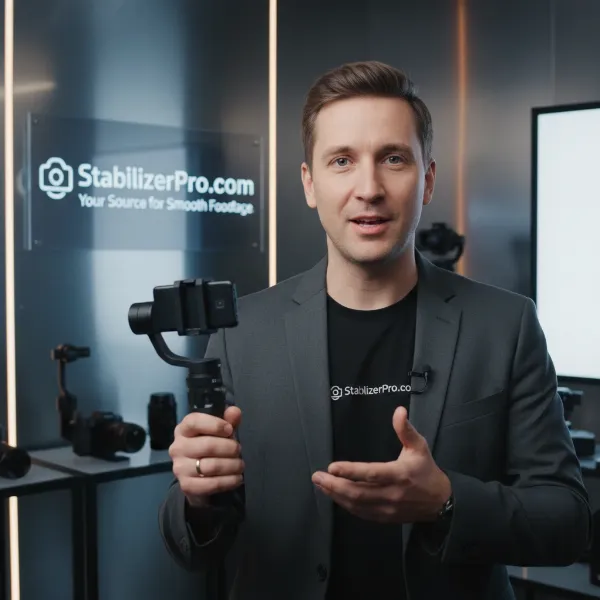
 Gimbal operator uses a wireless video transmitter system to monitor real-time footage on set.
Factors to Consider When Choosing a Wireless Video Transmitter for Gimbal
Selecting the ideal wireless video transmitter involves evaluating several key factors that directly impact performance, compatibility, and usability within a gimbal setup.
Camera Compatibility
The first step is ensuring your transmitter works seamlessly with your camera and gimbal. Different cameras utilize various video output ports (HDMI, SDI) and have distinct weight and power requirements.
- DSLR/Mirrorless Cameras: These cameras often use HDMI outputs. You’ll need a transmitter with an HDMI input and preferably a compact, lightweight design that won’t disrupt the gimbal’s balance. Many prosumer transmitters are well-suited for these setups.
- Action Cameras (GoPro, DJI): While some action cameras have HDMI output, their compact size means the wireless transmitter also needs to be exceptionally small and light, or integrated into the camera/gimbal system itself (like some DJI ecosystems).
- Cinema Cameras: Professional cinema cameras typically feature SDI outputs, which are more robust and reliable for long cable runs. For these setups, look for transmitters with SDI inputs and outputs, as well as robust mounting options and power solutions.
Budget
Wireless video transmitters span a wide price range, from affordable prosumer models to high-end professional systems. Your budget will heavily influence the features and performance you can expect.
- Entry-Level (Under $300): These often offer basic 1080p30 transmission with moderate range and potentially higher latency. Suitable for hobbyists or those with less critical real-time monitoring needs.
- Mid-Range ($300-$800): This segment provides a balance of performance and cost, typically offering 1080p60, decent range (up to 1000ft), and acceptable latency (20-80ms). Brands like Accsoon and Hollyland have strong offerings here.
- High-End ($800+): Professional-grade systems from brands like Teradek and DJI deliver 4K transmission, ultra-low latency (<10ms), extended range, robust build quality, and advanced features like AES encryption and frequency hopping. These are ideal for demanding productions.
Purpose of Use
Your primary application will dictate the specific features you should prioritize.
- Vlogging, Travel, Quick Shoots: Portability, ease of setup, and moderate range are key. A compact, battery-powered system with HDMI input is often sufficient.
- Sports, Action, Dynamic Shots: Low latency is critical to ensure accurate monitoring and focus pulling. Robust signal reliability is also essential to avoid dropouts in fast-paced environments.
- Professional Productions, Short Films, Events: Ultra-low latency, 4K support, long range, multi-receiver capabilities, and SDI connectivity become vital. Encryption and strong interference resistance are also highly valued for these demanding scenarios.
Weight and Size
When mounted on a gimbal, every gram matters. The added weight of a transmitter can affect the gimbal’s balance, battery life, and overall payload capacity.
- Portability: Smaller, lighter transmitters are easier to integrate into compact gimbal setups. Look for units designed with a low profile to avoid interfering with gimbal movement.
- Payload Capacity: Always check your gimbal’s maximum payload to ensure it can comfortably handle your camera, lens, and the added weight of the wireless transmitter and any necessary mounting accessories. Overloading can strain motors and reduce stabilization performance.
Comparison of Popular Wireless Video Transmitters
Understanding the different types of wireless video transmission technologies can help you make an informed decision.
| Feature | Gimbal Integrated (e.g., DJI Transmission) | Dedicated (e.g., Teradek Bolt) | App-Based (e.g., Accsoon CineView Nano) |
|---|---|---|---|
| Pros | Seamless integration, compact | Professional reliability, ultra-low latency | Cost-effective, uses existing mobile devices |
| Cons | Brand-locked, potentially higher cost | High price, can be bulky | Higher latency, reliance on Wi-Fi |
| Ideal For | DJI gimbal users, streamlined workflows | High-end productions, critical monitoring | Indie filmmakers, vlogging, personal use |
Wireless Technology Overview
- 2.4GHz: Offers better penetration through obstacles but is highly susceptible to interference from Wi-Fi, Bluetooth, and other devices. Generally suited for shorter ranges and less demanding applications.
- 5GHz: Less congested than 2.4GHz, providing higher bandwidth and better reliability for HD streaming with reduced lag. Ideal for most professional environments.
- 60GHz (mmWave): Offers extremely high bandwidth for uncompressed 4K60 transmission with near-zero latency. However, it’s limited to very short, line-of-sight distances (around 10 meters) and is primarily used in premium studio settings.
- Proprietary Protocols: Many professional systems like Teradek Bolt and DJI Transmission use custom protocols optimized for superior performance, range, and integration within their ecosystems. This often comes with a higher price tag.
Top Wireless Video Transmitters for Gimbal Operators Today
Here’s a look at some of the most popular and highly-regarded wireless video transmitters frequently used by gimbal operators, catering to different needs and budgets.
Teradek Bolt 6 LT – The Professional’s Choice
The Teradek Bolt 6 LT series stands as a benchmark for professional wireless video transmission. Utilizing the less crowded 6GHz band in addition to 5GHz, it offers incredibly robust 4K video transmission with virtually zero latency (<1ms). Available in various ranges (750ft, 1500ft, 5000+ft), the Bolt 6 LT is renowned for its reliability and compatibility with other Bolt models. While its price point is higher, the performance and peace of mind it offers are unmatched for critical productions.
DJI Transmission – Integrated Ecosystem Powerhouse
DJI Transmission offers a highly integrated solution, especially beneficial for users within the DJI ecosystem (Ronin gimbals, Master Wheels). It boasts an impressive transmission range of up to 20,000 ft (6km) with low latency (around 68ms) and 1080p60 video. Its automatic frequency hopping ensures an anti-interference connection, and features like encrypted data transmission and multiple power methods make it a versatile option for professional use. The seamless integration with DJI products makes it a compelling choice for operators already invested in their gear.
Hollyland Mars 400S Pro – Mid-Range Performer
For those seeking a reliable mid-range option, the Hollyland Mars 400S Pro is a strong contender. This lightweight and compact system offers HDMI and SDI ports, providing connection flexibility. It delivers 1080p60 video over a 400ft transmission distance with less than 100ms latency. Powered by DC or USB-C, the Mars 400S Pro is a popular choice for indie filmmakers, event videographers, and content creators who need dependable wireless monitoring without a top-tier budget.
Accsoon CineView SE – Dual-Band Reliability
The Accsoon CineView SE stands out for its dual-band 2.4GHz and 5GHz transmission, combining signals for a glitch-free and stable connection. Priced competitively, it offers 1080p60 video and audio transmission to up to four devices (with receivers) over a 1200ft distance with less than 50ms latency. Its compact design and professional monitoring application make it an excellent choice for gimbal operators looking for reliable performance and flexibility without breaking the bank.
How to Use and Maintain Your Wireless Video Transmitter
Proper setup and maintenance are crucial for optimal performance and longevity of your wireless video transmitter.
Balancing and Setup
- Mounting: Securely attach the transmitter to your gimbal. Many operators use small mounting plates or cold shoe adapters. Consider mounting it on the gimbal’s handles or a side accessory mount to minimize interference with the camera’s balance. Ensure cables have enough slack to avoid tugging the camera, which can upset balance or damage motors.
- Cable Management: Use thin, flexible HDMI or SDI cables to connect your camera to the transmitter. Keep cables tidy and routed to prevent snags and maintain gimbal balance. Zip ties or small cable clips can be very helpful.
- Balancing: Always balance your gimbal with all accessories (camera, lens, wireless transmitter, and cables) attached. This is paramount for smooth operation and to prevent undue strain on the gimbal motors. Recheck balance throughout the day, especially if you change lenses or accessories.
- Power: Ensure your transmitter is adequately powered. Many transmitters can be powered by NP-F batteries, V-mount batteries (often mounted on the gimbal’s ring or handles), or via USB-C from the gimbal itself if it provides a power output.
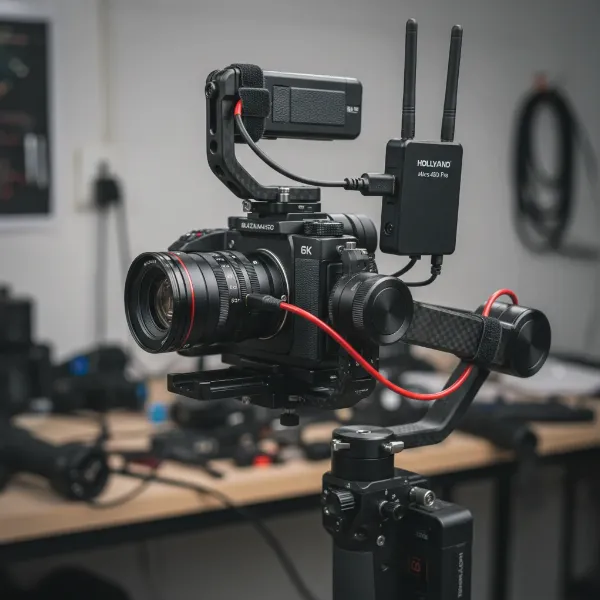 Close-up of a camera on a gimbal with a wireless video transmitter properly mounted and cabled.
Tips for Smooth Wireless Transmission
- Line of Sight: Maintain as much line of sight between the transmitter and receiver as possible. Obstacles like walls, people, and dense foliage can significantly degrade signal quality and range.
- Antenna Positioning: Properly orient antennas for best reception. Often, pointing them in a V-shape or slightly upwards can improve signal spread. Avoid placing antennas too close to large metal objects.
- Frequency Management: In crowded RF environments, use systems with frequency scanning or automatic frequency hopping features to find the clearest channel.
- Keep it Cool: Wireless transmitters can generate heat, especially during prolonged use. Ensure adequate ventilation and avoid direct sunlight to prevent overheating, which can lead to performance issues or device damage.
Cleaning and Storage
Regular cleaning and proper storage will extend the life of your equipment.
- Clean Connectors: Periodically clean HDMI/SDI ports and other connectors with isopropyl alcohol to prevent dust and grime buildup.
- Inspect Cables: Check cables for any signs of wear, fraying, or damage. Damaged cables can lead to intermittent signal loss.
- Storage: Store your transmitter in a dry, temperature-controlled environment, ideally in a protective case, to shield it from moisture, extreme temperatures, and physical damage.
Where to Buy Wireless Video Transmitters?
Acquiring a reliable wireless video transmitter means choosing reputable vendors and considering their support.
- Specialized Camera Equipment Stores: Retailers like B&H Photo Video and Adorama are excellent choices, offering a wide selection, detailed product information, customer reviews, and expert advice. They usually have good return policies and warranty support.
- Online Marketplaces: Amazon and other large online retailers also carry a vast array of transmitters. When purchasing here, prioritize sellers with high ratings and verified product authenticity.
- Manufacturer Websites: Buying directly from brands like Teradek, Hollyland, or Accsoon ensures you get genuine products and direct access to their customer support and warranty services.
When buying, always inquire about the warranty, return policies, and availability of technical support. Reading product reviews from other gimbal operators can also provide valuable real-world insights into a product’s performance and reliability.
Buying Guide: Expert Advice
Navigating the options can be overwhelming, so here’s some expert advice to simplify your decision:
“The best wireless video transmitter isn’t necessarily the most expensive one; it’s the one that flawlessly meets your specific project’s demands for range, latency, and integration with your existing gimbal setup.” – Liam Connor, Professional Gimbal Technician
- Clearly Define Your Needs: Before looking at any product, outline your primary use case. What kind of camera are you using? What is your typical shooting environment (indoor, outdoor, crowded RF)? How critical is latency for your workflow?
- Read Reviews and Compare: Don’t rely solely on manufacturer specifications. Seek out independent reviews, user testimonials, and comparison videos, especially from gimbal operators. Pay attention to real-world performance regarding range, latency, and signal stability.
- Prioritize Compatibility and Integration: Ensure the transmitter is compatible with your camera’s video outputs (HDMI/SDI) and can be easily mounted and powered on your specific gimbal without compromising its balance or functionality. Systems that seamlessly integrate with your gimbal ecosystem (like DJI Transmission for Ronin users) can offer a smoother experience.
- Consider Future-Proofing: While budget is a factor, consider investing in a system that can grow with your needs. A transmitter that supports 4K (even if you shoot 1080p now) or offers multi-receiver capabilities might save you from future upgrades.
- Evaluate Support and Warranty: A reliable wireless system is an investment. Choose brands known for good customer service and robust warranty policies.
Conclusion
The evolution of wireless video transmitters has fundamentally reshaped how gimbal operators work, offering unprecedented freedom and collaborative potential. By carefully considering factors such as camera compatibility, budget, intended use, and key technical specifications like latency and range, you can select a system that not only enhances your filmmaking capabilities but also streamlines your on-set workflow. From the robust reliability of a Teradek Bolt 6 LT to the integrated convenience of DJI Transmission or the value-packed performance of a Hollyland Mars 400S Pro, the right wireless video transmitter is out there to help you capture those perfectly stable, smooth shots with effortless monitoring.
What kind of cinematic freedom will a wireless video transmitter unlock for your next gimbal project?
Frequently Asked Questions
What is the typical range of a wireless video transmitter suitable for gimbals?
Most prosumer models offer an effective range of 300-1200 feet line-of-sight, while professional systems can extend to several thousand feet. Walls and signal interference will reduce this effective range in real-world scenarios.
Can wireless video transmitters cause interference with gimbal operations?
High-quality wireless video transmitters are designed to minimize interference. However, using crowded frequency bands (like 2.4GHz) or improperly shielded units can sometimes cause minor glitches. Choosing a system with robust anti-interference features helps maintain smooth gimbal performance.
How critical is low latency for gimbal operators?
Low latency is extremely critical for gimbal operators, especially for focus pullers and directors monitoring in real-time. A delay of more than 50ms can make precise focus pulling or quick shot adjustments challenging, impacting the quality of dynamic footage.
Can I use a smartphone as a receiver with wireless video transmitters for gimbals?
Many modern wireless video transmitters, particularly in the prosumer segment, offer companion apps that allow smartphones or tablets to act as receivers. This is a cost-effective solution for monitoring, though app-based connections may have slightly higher latency compared to dedicated receivers.
What are the main differences between HDMI and SDI inputs/outputs on transmitters?
HDMI is common on consumer and prosumer cameras, suitable for shorter distances. SDI is a professional standard, offering a more robust connection for longer cable runs and locking mechanisms, making it preferred for demanding production environments and cinema cameras.