As a dedicated videographer or photographer, you understand that buttery-smooth footage and stable shots are non-negotiable. Your camera stabilizer, particularly its delicate motors, is the unsung hero behind those professional-looking results. But like any precision instrument with moving parts, motors, and sensors, your gimbal needs consistent care to perform at its best and extend its lifespan. Neglecting routine maintenance can quickly lead to frustrating issues, turning perfectly planned shots into shaky disappointments. This comprehensive guide will walk you through the essential steps for cleaning and maintaining your gimbal motors, ensuring they remain in pristine condition for years of flawless operation.
What is a Camera Stabilizer (Gimbal) and Why Do Its Motors Need Maintenance?
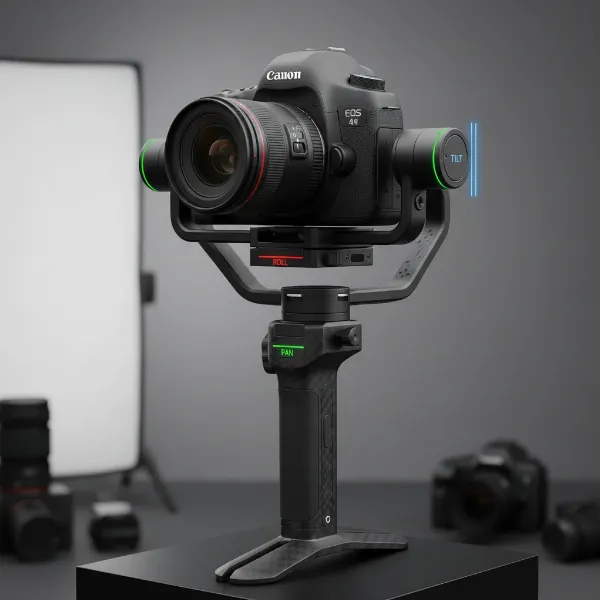
A camera stabilizer, often referred to as a gimbal, is a sophisticated device that uses brushless motors and advanced algorithms to keep your camera level and steady, compensating for unwanted movements. These motors are the heart of the stabilization system, constantly working to counteract motion across multiple axes (usually pitch, roll, and yaw).
The continuous operation of these motors, often in diverse environments, makes them susceptible to accumulating dust, dirt, and debris. Skipping maintenance can lead to several performance-degrading problems. You might experience jittery or uneven movement as foreign particles interfere with motor function and sensor calibration. This can also lead to reduced stabilization, as dust buildup throws off balance. Over time, overworked motors struggling to compensate for resistance can suffer from increased battery drainage, overheating, and accelerated wear on components. If your gimbal starts behaving unusually—feeling stiff, making strange noises, or failing to stabilize effectively—it’s a clear signal that it’s time for a thorough cleaning and maintenance routine.
Essential Tools and Supplies for Gimbal Motor Cleaning
Proper maintenance begins with having the right tools. Using inappropriate materials can cause more harm than good, so gather these items before you begin.
Recommended Cleaning Tools
To effectively clean your gimbal motors without causing damage, you’ll need a specific set of tools:
- Soft Brush or Air Blower: Essential for removing loose dust and debris from the motor areas and other hard-to-reach spots. An air blower provides a gentler option than compressed air, which can sometimes introduce moisture or be too forceful.
- Microfiber Cloth: Ideal for wiping down exterior surfaces and carefully cleaning around the motors. Its soft, non-abrasive fibers prevent scratching.
- Isopropyl Alcohol (70-90%): A safe and effective solvent for tackling stubborn dirt, oil, or grime. The higher percentage ensures quick evaporation, minimizing moisture exposure.
- Cotton Swabs (Q-tips): Perfect for precision cleaning around the motor edges, in crevices, and on delicate components.
- Silicone Lubricant (If Applicable): Only use if explicitly recommended by your gimbal’s manufacturer. A tiny drop of specialized silicone lubricant can reduce friction in specific moving parts, but excess can attract dust.
|
Our Picks for the Best Camera Stabilizer in 2026
As an Amazon Associate I earn from qualifying purchases.
|
||
| Num | Product | Action |
|---|---|---|
| 1 | FeiyuTech SCORP 2 Gimbal Stabilizer for DSLR and Mirrorless Camera, Integrated Al Tracking Sensor, 3-Axis Camera Stabilizer for Sony Canon Panasonic Nikon, 2.5kg Payload Touch Screen Vertical Shooting |

|
| 2 | DJI RS 3 Mini, 3-Axis Gimbal Stabilizer for Cameras Canon/Sony/Panasonic/Nikon/Fujifilm, 2 kg (4.4 lbs) Tested Payload, Camera Gimbal with Native Vertical Shooting, Black |
|
| 3 | 3-Shoe DSLR/Mirrorless/Action Camera Camcorder Phone Stabilizer Expansion Cage Mount Moviemaking Holder Rig YouTube Tiktok Vlogging Video Kit Compatible with GoPro Canon Nikon Sony iPhone Android |
|
| 4 | DJI Osmo Mobile 7 Gimbal Stabilizer for iPhone, Android, Built-in Tripod, Portable Stabilizer for iPhone, Selfie Stick, 3-Axis Phone Gimbal, ActiveTrack 7.0, One-Tap Edit, 10hrs Use, Phone Charging |
|
| 5 | Zeadio Camera Stabilizer Kit, All-in-One Handheld Stabilizer with LED Video Light, Microphone, Phone Holder & Action Camera adaper, Fits for All Camera, DSLR, Action Camera and All Smartphones |
|
| 6 |
|
|
| 7 | DJI Osmo Mobile 7P Gimbal Stabilizer for iPhone, Android, Native Tracking, Lighting, 3-Axis Phone Gimbal, Quick Launch, One-Tap Edit, Built-in Extension Rod & Tripod, 10hrs Use, Phone Charging |
|
| 8 | DJI Osmo Mobile 8 Advanced Tracking Combo Gimbal Stabilizer for Phone, AI Native Tracking with Audio & Lighting, 360° Pan Rotation, Built-in Extension Rod & Tripod, 10h Battery, Extension Rod |
|
| 9 | Zeadio Video Action Stabilizing Handle Grip Handheld Stabilizer with Cold-Shoe Mount for All DSLR Camera Camcorder |
|
| 10 | ZHIYUN CINEPEER Weebill 3E [Official], 3-Axis Lightweight Gimbal Stabilizer for DSLR & Mirrorless Camera Canon/Sony/Panasonic/Nikon, 3KG Payload, Native Vertical Shooting, Bluetooth Shutter Control |
|
What to Avoid
Just as important as knowing what to use is knowing what to avoid. These substances and materials can permanently damage your gimbal motors:
- Excess Moisture: Water or excessive liquid can corrode electronics and motors. Always apply cleaning solutions sparingly and ensure quick evaporation.
- Harsh Chemicals: Abrasive cleaners, solvents not specified for electronics, or household detergents can damage plastic components, coatings, and internal mechanisms.
- Paper Towels or Rough Cloths: These can leave behind lint or scratch delicate surfaces, creating new problems instead of solving old ones.
Step-by-Step Guide to Cleaning Your Gimbal Motors
Follow these steps carefully to ensure a thorough and safe cleaning process for your gimbal motors.
Step 1: Power Down and Initial Inspection
Before touching your gimbal, ensure it is completely powered off. This prevents accidental activation and potential damage. Begin by visually inspecting the entire unit, paying close attention to the motors, joints, and any moving parts. Look for visible dust, dirt, sand, hair, or any obstructions. Note any areas that seem particularly dirty or stiff. This initial inspection helps you target your cleaning efforts.
Step 2: Gentle Dust Removal
Start with the least intrusive methods to remove loose particles. Use your soft brush or air blower to gently dislodge dust from the motor housings, axes, and surrounding areas. Move the gimbal through its full range of motion while blowing or brushing to expose all sides of the motors and ensure no hidden dust remains. This step is crucial for preventing debris from being pushed further into the mechanisms during subsequent cleaning.
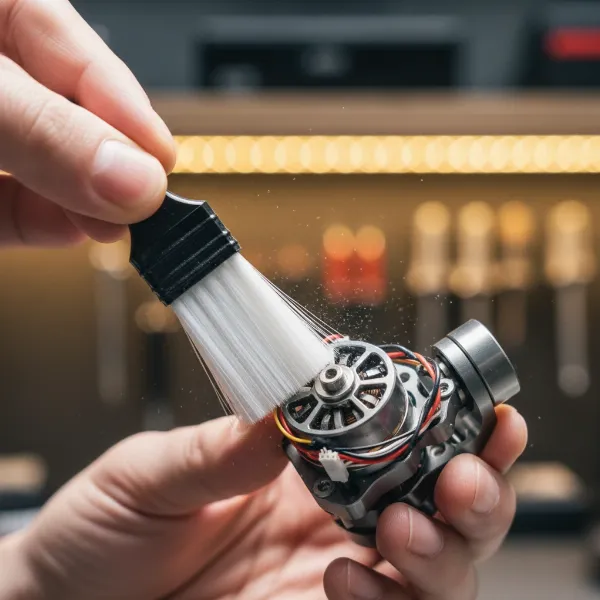 A person gently cleaning gimbal motors with a soft brush, removing dust and debris to maintain optimal performance.
Step 3: Tackling Stubborn Dirt and Grime
For more persistent dirt, grime, or smudges, use a dry cotton swab to gently wipe around the motor edges and in tight spaces. For truly stubborn spots, moisten a cotton swab or a corner of your microfiber cloth with a small amount of isopropyl alcohol (70-90%). Gently wipe the affected areas. The alcohol will help dissolve oils and grime, evaporating quickly to minimize moisture exposure. Remember, never apply excessive force, as delicate motor coils and sensors can be easily damaged. Avoid saturating any part of the gimbal directly with alcohol; instead, apply it to your cleaning tool.
Step 4: Lubrication (If Applicable)
Some gimbal manufacturers recommend occasional lubrication for specific moving parts, typically bearings, to reduce friction and maintain smooth operation. If your manufacturer’s manual explicitly advises lubrication, apply a tiny drop of the recommended silicone lubricant to the specified points. Be extremely careful not to over-lubricate, as excess oil can attract more dust and debris, creating a sticky buildup that works against smooth motor movement. If the manual does not mention lubrication, it’s best to avoid it altogether to prevent potential issues.
Ongoing Maintenance Tips for Long-Term Gimbal Motor Health
Cleaning your gimbal motors periodically is only one aspect of responsible ownership. Adopting good habits for daily use and storage will significantly contribute to your gimbal’s longevity.
- Regular Routine: Establish a routine for cleaning based on your usage frequency and environment. If you frequently shoot outdoors in dusty or sandy conditions, a quick clean after each use is advisable. For lighter indoor use, a thorough clean once a month might suffice. Regular, light cleaning prevents major buildups.
- Proper Storage: When not in use, always store your gimbal in its dedicated case or a clean, dust-free environment. This protects it from dust accumulation, accidental bumps, and environmental elements like humidity that can affect electronics and motor performance.
- Careful Handling and Transport: Avoid dropping or roughly handling your gimbal. Sudden impacts can damage internal motor components or throw off their delicate calibration. When transporting, ensure it’s securely packed in a padded case to absorb any shocks.
Troubleshooting Common Gimbal Motor Issues
Even with diligent maintenance, issues can sometimes arise. Knowing how to identify and address them can save you time and prevent costly repairs.
- Unstable or Jerky Movement: This is often the primary symptom of dirty motors or an unbalanced setup. After ensuring your camera is perfectly balanced on the gimbal, if the issue persists, a thorough motor cleaning is likely the solution. Check for any hair or debris wrapped around the motor shafts.
- Overheating or Strange Noises: Overheating motors can indicate excessive friction, often caused by dirt and debris forcing the motors to work harder than they should. Strange grinding or whining noises also point to friction or an obstruction. Power down immediately, inspect, and clean the motors. If the problem continues, it might indicate a more serious internal issue requiring professional service.
Buying Guide: Expert Advice for Gimbal Care
Choosing the right gimbal is just the first step; maintaining it properly is key to maximizing your investment. As an Admin of StabilizerPro.com with over a decade of experience, my advice is always to prioritize preventative care.
> “Your gimbal motors are the unsung heroes of smooth footage. Treat them with the respect they deserve through regular, meticulous cleaning, and they’ll reward you with years of flawless performance. Always consult your manufacturer’s manual – it’s the ultimate authority on your specific gear.” – Admin, StabilizerPro.com
Invest in quality cleaning tools. A good set of brushes, microfiber cloths, and a reliable air blower are inexpensive investments that pay dividends in equipment longevity. Don’t skimp on these essentials. Furthermore, always refer to your gimbal’s user manual for specific cleaning and maintenance recommendations. Different manufacturers may have unique guidelines or recommend particular lubricants. Following these instructions is crucial to avoid voiding warranties or causing unintended damage.
Conclusion
Maintaining your gimbal motors is not just about extending the life of your equipment; it’s about safeguarding the quality of your creative work. A clean, well-maintained gimbal ensures that every shot is as smooth and stable as intended, allowing your artistic vision to shine through without the distraction of shaky footage. By regularly dedicating a few minutes to gentle cleaning and following proper storage and handling practices, you can prevent common issues like jittery movements, battery drain, and premature wear. Remember, prevention is always better than repair, especially when it comes to sensitive electronics. So, are you ready to give your gimbal motors the care they deserve and unlock their full potential for buttery-smooth videography?
Frequently Asked Questions
How often should I clean my gimbal motors?
The frequency depends on your usage and environment. For heavy use or dusty conditions, clean after every few uses. For light use, a monthly detailed cleaning is generally sufficient to prevent debris buildup and ensure optimal performance.
Can I use water to clean my gimbal motors?
No, it is highly recommended to avoid using water or excessive moisture directly on gimbal motors or electronics. Water can cause corrosion and damage sensitive components. Always use dry methods first, and sparingly apply isopropyl alcohol on a cotton swab for stubborn grime, ensuring quick evaporation.
What causes my gimbal motors to make strange noises?
Strange noises, such as grinding or whining, often indicate friction or an obstruction within the motor mechanism. This is typically due to accumulated dust, dirt, or debris interfering with the moving parts. A thorough cleaning of the motors is usually the first step to resolve this issue.