Are your smartphone videos often marred by shaky footage, making your amazing moments look less than professional? In today’s fast-paced world of mobile content creation, achieving buttery-smooth video is no longer a luxury but a necessity. Enter the Insta360 Flow, a revolutionary smartphone stabilizer that promises to transform your handheld shots into cinematic masterpieces, all while intelligently tracking your subject. With its innovative AI capabilities and versatile 4-in-1 design, the Insta360 Flow aims to be the only camera companion you’ll ever need. This comprehensive review will delve into its features, performance, and overall value to determine if it truly stands as the ultimate AI tracking stabilizer for your smartphone.
What is a Camera Stabilizer and Why Do You Need One?
A camera stabilizer, often referred to as a gimbal, is a device designed to minimize unwanted camera movement and vibrations, resulting in incredibly smooth and stable video footage. For smartphone users, a 3-axis gimbal like the Insta360 Flow counteracts shakes and tilts across three dimensions – pan, tilt, and roll – ensuring your horizon remains level and your shots glide effortlessly. The primary reason for needing a stabilizer is to elevate the production quality of your videos. Whether you’re a vlogger, a travel enthusiast, or simply someone who loves capturing family memories, a stabilizer instantly makes your content look more professional, engaging, and enjoyable to watch by eliminating distracting jitters.
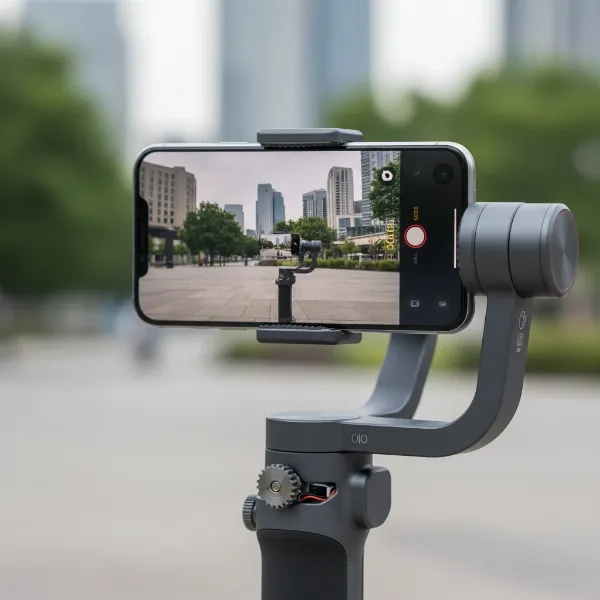 Smartphone mounted on a 3-axis gimbal stabilizer for smooth video recording.
Factors to Consider When Choosing a Camera Stabilizer
Selecting the right camera stabilizer can seem daunting given the variety of options available. To make an informed decision, it’s crucial to consider several key factors that align with your specific filming needs and equipment.
Camera Type
The Insta360 Flow is purpose-built for smartphones, supporting a wide array of models, including both iOS and Android devices, with compatible phone thicknesses between 6.9-10mm and widths of 64-84mm. This stabilizer is not designed for heavier DSLR, mirrorless cameras, or dedicated action cameras, which typically require more robust and specialized gimbal systems. If your primary recording tool is your smartphone, the Flow is a highly relevant option.
Budget
Smartphone stabilizers span various price points. The Insta360 Flow 2, for example, is competitively priced around $109.99, offering significant value for an entry-level smartphone stabilizer, especially considering its advanced AI tracking capabilities and integrated features. While other gimbals might be slightly cheaper, the Flow’s multi-functionality often justifies its cost by reducing the need for additional accessories.
Purpose of Use
Your filming intentions heavily influence the best stabilizer choice. The Insta360 Flow excels for content creators focused on vlogging, travel videos, social media content (like Instagram Reels and TikToks), and even hands-free tutorials or video calls. Its AI tracking makes it an ideal personal camera operator for solo creators. If your goal is high-end cinematic production with complex rigs, you might need a different class of stabilizer, but for mobile-first content, the Flow is a powerful tool.
Weight and Size
Portability is a major advantage of the Insta360 Flow. Its compact and foldable design ensures it can easily fit into your bag without taking up much space, making it perfect for on-the-go shooting. Weighing approximately 373g (for the Flow 2), it’s manageable for extended use, and its payload capacity supports heavier smartphones up to 300g, rivaling competitors like the DJI Osmo Mobile 6.
Comparing Popular Camera Stabilizer Types
While the Insta360 Flow is a smartphone gimbal, it’s helpful to understand its place within the broader ecosystem of camera stabilizers. Different types cater to distinct needs and offer varying levels of stability and functionality.
| Feature | Gimbal (Insta360 Flow) | Steadicam | Slider |
|---|---|---|---|
| Pros | Easy to use, compact, advanced AI tracking, multi-functional (tripod, selfie stick, power bank), intuitive app. | Offers superior stability for walking/running shots, provides a very fluid, “floating” camera effect. | Creates smooth, precise linear camera movements, excellent for dynamic product shots and interviews. |
| Cons | Requires battery power, some models have limited tilt/pan range (standard Flow 2), can feel small for large hands. | High learning curve, heavy and bulky, expensive, requires significant practice for mastery. | Limited to linear movement, often requires flat surfaces, not suitable for handheld, dynamic shots. |
| Best For | Vlogging, travel, social media content, self-shooters, casual video recording, hands-free operation. | Professional film and broadcast production, music videos, complex tracking shots with controlled movement. | Interviews, product showcases, timelapses, B-roll footage requiring controlled, steady horizontal motion. |
Insta360 Flow: A Deep Dive into the Features and Performance
The Insta360 Flow is engineered to bring professional-grade stabilization and intelligent tracking to your smartphone. Its suite of features is designed to empower content creators of all levels.
Core Stabilization and AI Tracking
At its heart, the Insta360 Flow provides excellent 3-axis stabilization, ensuring your smartphone footage remains incredibly smooth, even when you’re moving. It consistently keeps the horizon level, allowing for clean, professional-looking video.
The standout feature is its Deep Track 3.0 AI tracking. This advanced artificial intelligence is remarkably accurate and boasts superior subject recovery, even outperforming DJI’s ActiveTrack 5.0 in many scenarios. It can autonomously follow a person, pet, or object, panning and tilting your smartphone to keep the subject perfectly framed. For those with the Insta360 Flow Pro 2, an upgraded version, this tracking extends to infinite pan tracking, allowing for a full 360° rotation axis to follow subjects seamlessly, which is a significant game-changer for dynamic shots. Additionally, the Flow Pro 2 offers the capability to face track even when using native iOS camera apps, enhancing flexibility.
Multi-Functional Design and Ergonomics
The Insta360 Flow truly shines with its 4-in-1 versatile design. It integrates a sturdy mini tripod that deploys from the handle, an extendable selfie stick (or extension rod) for wider shots and unique angles, and a built-in power bank functionality to charge your phone during long shoots, all in one compact device.
Attaching your smartphone is effortless, thanks to its magnetic phone clamp, which allows for quick and secure mounting and dismounting. This magnetic system is a thoughtful design touch, making it easy to switch between using your phone for filming and regular use. The stabilizer also features intuitive controls, including a circular touch panel for quickly changing gimbal modes and physical buttons for recording, making it user-friendly for both novices and experienced videographers. Its compact and foldable design not only enhances portability but also makes it instantly ready to shoot.
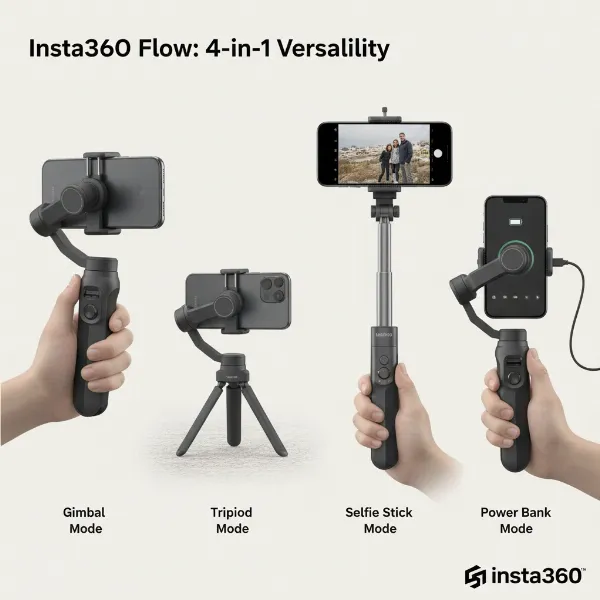 Insta360 Flow demonstrating its 4-in-1 features: gimbal, tripod, selfie stick, power bank.
The Insta360 App Experience
The Insta360 companion app is an integral part of the Flow’s experience, offering a polished and largely bug-free interface that unlocks the gimbal’s full potential. The app provides a wide array of creative features beyond basic stabilization, including panoramic shots, TimeShift (hyperlapse) sequences, and a “Live Mode” that enables the gimbal’s smart tracking in other applications, such as video calls or third-party camera apps. The app also supports gesture control, allowing you to trigger AI tracking and start/stop recording with simple hand movements, perfect for hands-free operation.
Top Camera Stabilizers: How Insta360 Flow Compares
When evaluating the Insta360 Flow, it’s natural to compare it with other leading smartphone stabilizers, particularly the popular DJI Osmo Mobile series.
Insta360 Flow vs. DJI Osmo Mobile 6/7
Both the Insta360 Flow and the DJI Osmo Mobile 6/7 offer excellent 3-axis stabilization, providing smooth and professional footage. However, the Insta360 Flow’s Deep Track 3.0 AI tracking often takes the lead, recognized for its superior accuracy and ability to recover subjects more effectively than DJI’s ActiveTrack 5.0.
A significant differentiator is the Flow’s 4-in-1 multi-functional design. While DJI models are dedicated gimbals, the Insta360 Flow integrates a built-in tripod, an extendable selfie stick, and a power bank, offering unparalleled versatility without needing extra accessories. In terms of portability, the Flow’s foldable design is compact. While the DJI Osmo Mobile 6 is slightly lighter (309g vs. Flow 2’s 373g), the Flow’s integrated features often make it the more practical travel companion by reducing the total gear you need to carry.
When it comes to native app support, the standard Insta360 Flow 2 largely relies on its own app for advanced AI tracking features. However, the Insta360 Flow Pro 2 version offers face tracking directly within native iOS camera applications, a useful upgrade that addresses a common user request. The choice between these popular brands often comes down to prioritizing either the Flow’s integrated versatility and superior AI tracking or the DJI’s slightly lighter weight and alternative grip style.
How to Use and Maintain Your Insta360 Flow
Getting started with the Insta360 Flow is designed to be straightforward, allowing you to focus on creativity rather than complex setups.
Quick Setup and Balancing: One of the Flow’s advantages is its minimal setup time. Thanks to its magnetic phone mount, you simply clip your phone, attach it to the gimbal, and the auto-balancing system quickly prepares it for use. Unlike traditional gimbals, there’s no tedious manual balancing required.
Tips for Smooth Footage:
- Master the Modes: Experiment with modes like Pan Follow (gimbal pans with your hand, maintains tilt/roll), Follow (gimbal follows pan and tilt but keeps horizon level), and FPV (gimbal mimics your movements for dynamic, immersive shots).
- Utilize AI Tracking: Engage Deep Track 3.0 via the app or gesture control for hands-free, perfectly framed shots, especially useful for solo vlogging or demonstrations.
- Smooth Movements: Practice slow, deliberate movements with the gimbal to achieve the most fluid results.
- Extension Rod: Use the built-in extension rod for higher angles, wider shots, or unique crane-like effects.
- Tripod Function: Deploy the integrated tripod for stable shots, timelapses, or hands-free AI tracking when you need to be in front of the camera.
Cleaning and Care: To ensure the longevity and optimal performance of your Insta360 Flow, regularly wipe it down with a soft, dry cloth. Keep the magnetic phone clamp clean for a secure grip, and avoid exposing the device to extreme temperatures or water. Store it in its folded, compact state in a protective bag to prevent damage.
Where to Buy Your Insta360 Flow
The Insta360 Flow is widely available through various reputable retailers, making it accessible to a broad audience.
You can purchase the Insta360 Flow directly from the official Insta360 website, which often features special promotions and bundle deals, sometimes including free accessories like the Spotlight fill light. Additionally, major electronics retailers and online marketplaces such as Amazon, Sweetwater Sound, Best Buy, Adorama, and Newegg stock the Insta360 Flow, offering competitive pricing and diverse shipping options. When buying, always check the product details to ensure you’re getting the specific version you desire (e.g., standard Flow 2 or Flow Pro 2) and review the warranty and return policies.
Buying Guide: Expert Advice for Your Stabilizer Purchase
As an experienced technician in Camera Stabilizers, I offer these final pieces of advice to guide your purchase:
- Define Your Needs: Clearly identify your primary use case. If intelligent AI tracking for a smartphone, portability, and multi-functionality (selfie stick, tripod, power bank) are at the top of your list, the Insta360 Flow is an excellent candidate.
- Read Diverse Reviews: While this review covers many aspects, cross-reference with other user experiences and professional reviews to get a well-rounded perspective. Pay attention to common praise and criticisms to manage your expectations.
- Compare with Direct Competitors: Consider how the Insta360 Flow stacks up against key rivals like the DJI Osmo Mobile series. Focus on the specific features that matter most to you, such as AI tracking accuracy, battery life, and integrated design.
- Check Warranty and Support: Ensure you understand the manufacturer’s warranty and customer support options. A reliable warranty provides peace of mind for your investment.
“The true value of a smartphone stabilizer like the Insta360 Flow isn’t just in making your videos smoother, but in empowering you to create dynamic, engaging content effortlessly, transforming your phone into a genuinely versatile production tool.” – Admin, StabilizerPro.com
Conclusion
The Insta360 Flow distinguishes itself as a powerful contender in the smartphone stabilizer market, particularly for its exceptional AI tracking capabilities. Its Deep Track 3.0 technology, combined with a highly versatile 4-in-1 design that includes a built-in tripod, extension rod, and power bank, makes it an incredibly convenient and effective tool for mobile content creators. While some limitations exist, such as specific pan/tilt ranges on the standard model and initial grip ergonomics for some users, its overall performance, intuitive app experience, and portability present a compelling package. For anyone looking to elevate their smartphone videography with smart, hands-free tracking and robust stabilization, the Insta360 Flow offers a compelling solution that can indeed act as your personal camera operator. Are you ready to elevate your mobile filmmaking?
Frequently Asked Questions
Is the Insta360 Flow compatible with all smartphones?
Yes, the Insta360 Flow is designed to be highly compatible with a wide range of smartphones, supporting both iOS and Android devices. It accommodates phones with a thickness between 6.9-10mm and a width of 64-84mm, ensuring most modern smartphones fit securely.
What is Deep Track 3.0?
Deep Track 3.0 is Insta360’s cutting-edge artificial intelligence object tracking technology. It allows the Flow to automatically follow a designated subject with remarkable accuracy and speed, even if they momentarily move out of frame, ensuring they remain perfectly centered in your shot.
How long does the Insta360 Flow’s battery last?
The Insta360 Flow 2 is equipped with a robust 2900mAh battery, providing an impressive battery life of approximately 10 hours on a single charge. This extended duration is ideal for long shooting sessions, and its power bank functionality means it can also charge your phone.
Can I use Insta360 Flow with third-party camera apps?
While the standard Insta360 Flow 2 primarily utilizes the Insta360 app for its full AI tracking and advanced features, the Insta360 Flow Pro 2 version offers enhanced compatibility, allowing for face tracking capabilities even when using native iOS camera applications.