Unleash your creative potential without being weighed down by bulky gear. In an era where smooth, professional-grade video is no longer a luxury but a necessity for captivating audiences, camera stabilizers have become indispensable. But for content creators on the move – the intrepid travelers, the dynamic vloggers, and the run-and-gun filmmakers – the challenge often lies in finding a stabilizer that’s both powerful and portable. The DJI RS 3 Mini emerges as a compelling answer to this dilemma, promising robust stabilization in a remarkably compact form. This review delves deep into its capabilities to determine if it truly stands as the best lightweight travel gimbal for your adventurous cinematic journey.
What is a Camera Stabilizer and Why Do You Need One?
A camera stabilizer is a device designed to minimize unwanted camera movement, such as shakes, jitters, and vibrations, resulting in incredibly smooth and professional-looking footage. Imagine capturing a fast-paced action sequence or a flowing cinematic shot without a single jarring movement; that’s the magic a stabilizer brings to your videography. Without it, even the steadiest hands can struggle to produce consistently smooth video, especially when moving or filming dynamic subjects.
There are several popular types of camera stabilizers, each with distinct advantages. Gimbals, like the DJI RS 3 Mini, are electronic stabilizers that use motors and sensors to counteract movement across multiple axes, providing exceptional fluidity. Steadicams are mechanical stabilizers that rely on counterweights and a vest system to absorb shocks, often favored for complex, professional film productions. Sliders, on the other hand, create smooth linear movements, perfect for subtle tracking shots or interviews. For dynamic, handheld videography, especially on the go, a 3-axis gimbal stands out for its versatility and effectiveness. The primary benefits of using a camera stabilizer are immediately apparent: achieving fluid, cinematic footage, elevating the production quality of your videos, and significantly reducing distracting shakes and jitters that can undermine your storytelling.
Factors to Consider When Choosing a Camera Stabilizer
Selecting the right camera stabilizer is crucial for optimizing your shooting experience and achieving your desired results. Several key factors should guide your decision-making process, ensuring the gimbal you choose perfectly aligns with your specific needs.
Camera Type
The type of camera you intend to use is perhaps the most critical consideration. Stabilizers are designed to support specific weight classes and form factors.
- DSLR/Mirrorless Cameras: Gimbals like the DJI RS 3 Mini are primarily engineered for these interchangeable lens cameras, offering the motor strength and balancing adjustments needed for professional-grade setups. Ensure the gimbal’s payload capacity can comfortably handle your camera body plus your heaviest lens combination.
- Action Cameras (GoPro, DJI Osmo Action): These smaller cameras typically require more compact and often simpler stabilizers, sometimes built into the camera itself or dedicated handheld units.
- Smartphones: Dedicated smartphone gimbals are lightweight and designed for mobile phones, often featuring AI tracking and compact folding designs.
|
Our Picks for the Best Camera Stabilizer in 2026
As an Amazon Associate I earn from qualifying purchases.
|
||
| Num | Product | Action |
|---|---|---|
| 1 | 3-Shoe DSLR/Mirrorless/Action Camera Camcorder Phone Stabilizer Expansion Cage Mount Moviemaking Holder Rig YouTube Tiktok Vlogging Video Kit Compatible with GoPro Canon Nikon Sony iPhone Android |

|
| 2 | FeiyuTech SCORP 2 Gimbal Stabilizer for DSLR and Mirrorless Camera, Integrated Al Tracking Sensor, 3-Axis Camera Stabilizer for Sony Canon Panasonic Nikon, 2.5kg Payload Touch Screen Vertical Shooting |
|
| 3 | Zeadio Video Action Stabilizing Handle Grip Handheld Stabilizer with Cold-Shoe Mount for All DSLR Camera Camcorder |
|
| 4 | Zeadio Camera Stabilizer Kit, All-in-One Handheld Stabilizer with LED Video Light, Microphone, Phone Holder & Action Camera adaper, Fits for All Camera, DSLR, Action Camera and All Smartphones |
|
| 5 | DJI Osmo Mobile 7P Gimbal Stabilizer for iPhone, Android, Native Tracking, Lighting, 3-Axis Phone Gimbal, Quick Launch, One-Tap Edit, Built-in Extension Rod & Tripod, 10hrs Use, Phone Charging |
|
| 6 | FeiyuTech SCORP 3 Gimbal Stabilizer for Camera, Built-in AI Tracking Sensor & Detachable Remote Control, 3.5KG Payload Camera Stabilizer with Touch Screen, Vertical Shooting |
|
| 7 | DJI RS 3 Mini, 3-Axis Gimbal Stabilizer for Cameras Canon/Sony/Panasonic/Nikon/Fujifilm, 2 kg (4.4 lbs) Tested Payload, Camera Gimbal with Native Vertical Shooting, Black |
|
| 8 | DJI Osmo Mobile 7 Gimbal Stabilizer for iPhone, Android, Built-in Tripod, Portable Stabilizer for iPhone, Selfie Stick, 3-Axis Phone Gimbal, ActiveTrack 7.0, One-Tap Edit, 10hrs Use, Phone Charging |
|
| 9 | ZHIYUN CINEPEER Weebill 3E [Official], 3-Axis Lightweight Gimbal Stabilizer for DSLR & Mirrorless Camera Canon/Sony/Panasonic/Nikon, 3KG Payload, Native Vertical Shooting, Bluetooth Shutter Control |
|
| 10 | DJI Osmo Mobile 8 Advanced Tracking Combo Gimbal Stabilizer for Phone, AI Native Tracking with Audio & Lighting, 360° Pan Rotation, Built-in Extension Rod & Tripod, 10h Battery, Extension Rod |
|
Budget
Your budget will naturally influence the options available.
- Entry-Level/Budget-Friendly: These often focus on basic stabilization for lighter cameras or smartphones, offering good value for casual users.
- Mid-Range: This segment, where the DJI RS 3 Mini sits, provides a strong balance of performance, features, and portability for serious enthusiasts and semi-professionals.
- High-End/Professional: These are robust systems designed for heavy cinema cameras, offering extensive accessory support and advanced controls, but come with a significantly higher price tag. Consider the long-term value and how the gimbal will grow with your skills and equipment.
Purpose of Use
Your primary shooting intentions will dictate which features are most important.
- Travel and Vlogging: Portability, quick setup, and native vertical shooting are highly desirable features. A lightweight design that fits easily into a backpack is key.
- Sports and Action: Robust stabilization for fast movements, durability, and sometimes splash-proof designs are essential.
- Professional Filmmaking/Short Films: High payload capacity, precise motor control, extensive accessory compatibility (follow focus, wireless video), and advanced cinematic modes are paramount.
Weight and Size
For creators constantly on the move, the physical characteristics of the stabilizer are paramount.
- Portability: A lightweight and compact design ensures ease of transport and less fatigue during extended shooting sessions. The ability to fold down quickly is a significant advantage for travel.
- Payload Capacity: This refers to the maximum weight the gimbal can effectively stabilize. Always check that your camera and lens combination falls comfortably within this limit. Overloading a gimbal can lead to poor performance and motor strain.
> “Choosing a camera stabilizer isn’t just about smooth footage; it’s about matching the tool to your creative rhythm and your camera’s demands. The perfect gimbal enhances your vision without becoming a burden.” – Alice Chen, Veteran Cinematographer & Gear Specialist
DJI RS 3 Mini: A Deep Dive into Features and Performance
The DJI RS 3 Mini stands out as an innovative solution for content creators seeking a powerful yet remarkably portable gimbal. This section explores its key features and how they translate into real-world performance, particularly for travel and everyday shooting.
Compact Design and Portability
Living up to its “Mini” designation, the DJI RS 3 Mini redefines portability for camera gimbals. It weighs a mere 795g (1.75 lbs) in portrait mode and 850g (1.8 lbs) with its horizontal plate, making it approximately 50% lighter than the RS 3 Pro and 40% lighter than the standard RS 3. Its compact dimensions allow it to easily slip into a shoulder bag, making it an ideal companion for travel vloggers and creators who prioritize a light setup. While its lighter build is a huge advantage for mobility, some users have noted that this reduced weight can sometimes make it feel less planted during certain complex movements compared to heavier gimbals. However, for the vast majority of handheld shooting scenarios, its ergonomic design and concentrated center of balance provide a comfortable and stable experience.
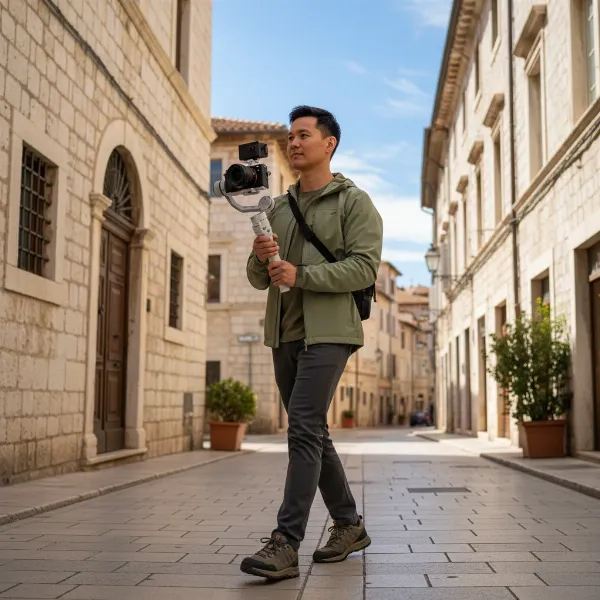 A person holding a DJI RS 3 Mini gimbal with a mirrorless camera attached, walking through a scenic outdoor location, highlighting its lightweight and portable design for travel.
Impressive Payload Capacity for its Size
Despite its diminutive size, the RS 3 Mini boasts a robust payload capacity of up to 2 kg (4.4 lbs). This makes it capable of handling a wide range of mainstream mirrorless camera and lens combinations, including popular setups like a Sony A7S3 with a 24-70mm F2.8 GM lens. This capacity is best-in-category for its weight class, offering significant versatility for creators using full-frame or APS-C mirrorless cameras. While it comfortably manages most setups, some users pushing the upper limits of its payload with heavier lenses or added accessories (like a cage) have reported the motors occasionally struggling, suggesting it’s best to stay within a reasonable margin of the maximum capacity for optimal performance.
Third-Gen RS Stabilization Algorithm
At the heart of the RS 3 Mini’s performance is DJI’s acclaimed 3rd-Gen RS Stabilization Algorithm, the same advanced technology found in its larger sibling, the RS 3 Pro. This algorithm delivers professional-grade image stabilization, ensuring your footage remains incredibly smooth and stable across diverse shooting conditions. Whether you’re running to capture a dynamic shot, aiming for a low-angle perspective, or using it in “flashlight mode,” the RS 3 Mini effectively minimizes camera shake, allowing for rich and confident camera movements. This means less time reshooting and more focus on creative expression.
Innovative Native Vertical Shooting
A standout feature tailored for the modern content landscape is the RS 3 Mini’s native vertical shooting capability. This innovation allows you to instantly switch between horizontal and vertical modes without needing additional accessories or complex reconfigurations. Simply mount your camera’s quick-release plate to the gimbal’s vertical arm, and you’re ready to create content perfectly optimized for social media platforms like TikTok and Instagram Stories. This seamless transition is a significant time-saver and a huge advantage for vloggers and social media influencers who frequently produce vertical video. The gimbal rotation angle in native vertical mode is also greatly expanded compared to other gimbals, offering the same intuitive control experience as horizontal shooting.
Intuitive Controls and User Experience
The RS 3 Mini prioritizes an intuitive user experience with a suite of accessible controls. It features a bright 1.4-inch full-color touchscreen with an updated user interface, allowing you to adjust most functions and access common settings quickly without needing the smartphone app. An ergonomic front dial can be rotated to control essential camera parameters such as focus, ISO, aperture, or shutter speed, and can also be assigned to control the gimbal’s three axes for enhanced solo shooting.
The Bluetooth Shutter Control enables wireless photo and video capture with compatible mirrorless cameras, eliminating the need for camera control cables and allowing for automatic reconnection after initial pairing. With supported Sony cameras and digital lenses, the front dial can even control optical or digital zoom. A dedicated Gimbal Mode Switch Button allows quick toggling between Pan Follow (PF), Pan and Tilt Follow (PTF), and FPV modes, with customizable follow speeds for a tailored shooting experience.
Long-Lasting Battery Life
Powering your creative endeavors for extended periods, the RS 3 Mini features an integrated battery grip with a 2450mAh battery, providing up to 10 hours of runtime. This ample battery life is sufficient for all-day shooting, minimizing interruptions for recharging. When it’s time to power up, the gimbal can be fully recharged in as little as 2.5 hours using the included USB-C cable, and it can even be used while charging.
Expansion and Connectivity
The RS 3 Mini is equipped with a NATO expansion port, a versatile mounting point that allows for the attachment of various accessories such as briefcase handles for low-angle shots, external fill lights, or monitors. The dual-layered quick-release plate is ARCA-standard compatible, facilitating easy transitions between the gimbal and other tripods without changing baseplates. Additionally, the DJI Ronin app unlocks a suite of intelligent features like Timelapse, Track (setting the gimbal to move along pre-set points), and Panorama, inspiring creative shot compositions. However, it’s worth noting that its accessory system is not as robust as the larger RS 3 or RS 3 Pro, which support more advanced accessories like the Ronin Image Transmitter or manual follow focus systems.
Comparing DJI RS 3 Mini with Alternatives
When evaluating the DJI RS 3 Mini, it’s helpful to consider its position relative to other popular stabilizers in the market, particularly its larger siblings and a key competitor like the Zhiyun Weebill 3. This comparison highlights its strengths and potential trade-offs.
| Feature | DJI RS 3 Mini | DJI RS 3 | Zhiyun Weebill 3 |
|---|---|---|---|
| Weight | 795g (vertical), 850g (horizontal) | 1270g (2.8 lbs) | ~1.1 kg (2.4 lbs) |
| Payload | Up to 2 kg (4.4 lbs) | Up to 3 kg (6.6 lbs) | Up to 3.3 kg (7.3 lbs) |
| Key Features | Native vertical shooting, 1.4″ touchscreen | Auto-locking axes, larger payload, robust accessory ecosystem | Built-in microphone, fill light, ergonomic wrist rest |
| Battery Life | 10 hours | 12 hours | 21 hours |
| Target User | Travel, vlogging, social media creators, mirrorless users | Serious enthusiasts, semi-pros, expanding setups | Vlogging, mirrorless users, all-in-one convenience |
The DJI RS 3 Mini shines in its unmatched portability, making it significantly lighter and more travel-friendly than both the standard RS 3 and the Zhiyun Weebill 3. Its native vertical shooting capability is a distinct advantage for social media content creators, a feature that requires an additional adapter for the RS 3.
However, the trade-off for its compact size is a lower payload capacity compared to its larger counterparts, meaning it might not handle heavier professional setups as effectively. The RS 3 also features convenient auto-locking axes, a feature absent in the Mini, which requires more manual arm retraction for storage. While the RS 3 Mini’s stabilization is excellent, some users have noted that the slightly heavier build of gimbals like the Weebill 3 or RS 3 can, paradoxically, contribute to a sense of greater stability, especially during more dynamic movements, due to increased inertia. The Weebill 3, on the other hand, offers a more integrated shooting experience with built-in accessories like a microphone and fill light, which the RS 3 Mini lacks. Ultimately, the RS 3 Mini prioritizes a streamlined, ultra-portable workflow, making it a strong contender for creators whose priority is a light and agile setup that can still deliver high-quality results.
Pros and Cons of the DJI RS 3 Mini
Like any piece of sophisticated gear, the DJI RS 3 Mini comes with its own set of advantages and limitations. Understanding these will help you determine if it’s the right fit for your workflow.
Pros:
- Exceptional Portability: Weighing under 2 lbs, it’s incredibly lightweight and compact, making it ideal for travel and extended handheld shooting sessions without fatigue. It easily fits into a small camera bag.
- Native Vertical Shooting: A revolutionary feature for social media creators, allowing instant switching between horizontal and vertical modes without extra accessories, streamlining workflow for platforms like TikTok and Instagram.
- Strong Stabilization: Utilizes the advanced 3rd-Gen RS stabilization algorithm, delivering professional-grade, smooth footage for a wide range of movements, including low-angle shots and running.
- Solid Payload Capacity for its Size: Supports up to 4.4 lbs, accommodating most mainstream mirrorless cameras and standard zoom lenses.
- Intuitive User Interface: Features a responsive 1.4-inch color touchscreen and a multi-function front dial for easy parameter adjustments and precise control.
- Long Battery Life: Offers up to 10 hours of operation, sufficient for a full day of shooting, with quick 2.5-hour USB-C charging.
- Bluetooth Shutter Control: Simplifies camera operation by allowing wireless control of photo and video recording, and even zoom with compatible lenses.
- ARCA-Standard Quick Release Plate: Ensures convenient switching between the gimbal and other tripods.
Cons:
- Shorter Handle: Compared to the larger RS 3, the Mini’s shorter handle offers less extension, which might be a drawback for self-recorded vlogs or specific shooting angles.
- Less Robust Accessory System: Lacks compatibility with some advanced accessories like the Ronin Image Transmitter or manual follow focus systems available for the RS 3/Pro, limiting expansion for highly specialized setups.
- Balancing Can Be Fiddly: While easier than some, the manual sliding adjustments for balancing can be less precise than geared screws found on larger models, and requires re-balancing after folding for storage.
- Touchscreen Responsiveness: Some users have reported the touchscreen sometimes requiring multiple presses to register input.
- No Onboard Light: Unlike some competitors (e.g., Zhiyun Crane M3), it doesn’t include an integrated video light, requiring external accessories for illumination.
- Smartphone Activation Required: Initial setup and firmware updates necessitate connecting to the DJI Ronin app.
- Limited Articulating Screen Visibility in Vertical Mode: When shooting vertically, swing-out LCDs on some mirrorless cameras can be blocked due to limited clearance.
Getting Started: Using and Maintaining Your DJI RS 3 Mini
To maximize the performance and longevity of your DJI RS 3 Mini, proper setup and care are essential. Even though it’s designed for ease of use, a few best practices will ensure you consistently capture smooth, professional footage.
How to Balance and Set Up Your Stabilizer
Balancing is the most crucial step for any gimbal, and the RS 3 Mini is no exception. While DJI provides a QuickStart guide and video tutorials, the process involves carefully adjusting your camera’s position on each of the three axes (tilt, roll, and pan) until it remains stable in any orientation, even when the gimbal is powered off.
- Mount Your Camera: Secure your camera onto the dual-layered quick-release plate.
- Unlock Axes: Release all four metal clamps on the gimbal arms to allow free movement.
- Balance the Tilt Axis (Vertical): Adjust the camera forward or backward on the mounting plate, then slide the vertical arm up or down until the camera remains horizontal without tilting up or down. Lock the tilt axis.
- Balance the Roll Axis (Horizontal): Slide the camera left or right on the roll arm until it remains level. Lock the roll axis.
- Balance the Pan Axis (Rotation): Adjust the horizontal arm length until the gimbal’s pan axis remains stationary when tilted. Lock the pan axis.
This process requires a bit of back-and-forth but becomes quicker with practice. The ruler markings on the arms are helpful guides for repeat setups.
Tips for Smooth Filming with Your Stabilizer
- Practice Your Movement: A gimbal stabilizes the camera, but your body movement still influences the shot. Practice “ninja walking” (bending your knees and keeping your core stable) to minimize up-and-down motion.
- Use Follow Modes Wisely: Experiment with Pan Follow (PF), Pan and Tilt Follow (PTF), and FPV modes to suit different shooting scenarios.
- Plan Your Shots: Even with a stabilizer, thoughtful camera movement enhances cinematic quality. Pre-visualize your path and composition.
- Leverage Intelligent Features: Use the Ronin app’s Timelapse, Track, and Panorama functions to add dynamic and creative elements to your videos.
- Avoid Overloading: Stick to the recommended payload capacity to ensure optimal stabilization performance and prevent motor strain.
Cleaning and Proper Maintenance
Regular cleaning and maintenance will extend the life of your RS 3 Mini.
- Clean Regularly: Use a soft, dry cloth to wipe down the gimbal body and motors. Avoid harsh chemicals.
- Keep Connectors Clean: Ensure USB-C ports and quick-release plate contacts are free of dust and debris.
- Store Properly: When not in use, power off the gimbal and secure all axis locks. Store it in its original packaging or a dedicated gimbal bag to protect it from impacts and dust.
- Update Firmware: Regularly check for and install firmware updates via the DJI Ronin app to ensure optimal performance and access new features.
Where to Purchase the DJI RS 3 Mini?
Acquiring your DJI RS 3 Mini from reputable sources is crucial for ensuring product authenticity, warranty coverage, and reliable customer support.
- Authorized Retailers: Major electronics and camera stores are excellent places to purchase. These stores, both brick-and-mortar and online, often provide direct manufacturer warranties and knowledgeable staff. For example, B&H Photo and Precision Camera are authorized dealers that provide detailed product information and customer reviews.
- Official DJI Store: Purchasing directly from DJI’s official website guarantees you receive an authentic product with full warranty support and access to the latest firmware updates.
- Online Marketplaces: While platforms like Amazon offer competitive pricing, always ensure you are buying from an authorized reseller to avoid grey market products that may lack warranty or support. Carefully check seller ratings and product reviews.
Key considerations when buying:
- Warranty and Return Policy: Verify the warranty period and understand the return and exchange policies of the retailer.
- Customer Support: Choose a seller known for good customer service in case you encounter any issues or have questions about your product.
- Bundles and Deals: Keep an eye out for bundles that might include useful accessories like extra batteries, carrying cases, or additional cables, offering better overall value.
Buying Guide: Expert Advice for Your Decision
Choosing the right camera stabilizer, especially one as versatile as the DJI RS 3 Mini, involves careful consideration of your unique needs and aspirations. Here’s some expert advice to help you make an informed decision.
Identify Your Needs and Purpose
Before making any purchase, take a moment to reflect on your primary use cases. Are you a travel vlogger who needs ultimate portability and quick setup for spontaneous shots? Do you mostly shoot for social media, where native vertical video is a game-changer? Or are you an aspiring filmmaker looking for professional-grade stability for cinematic projects? The DJI RS 3 Mini excels in lightweight, run-and-gun scenarios and is a strong choice for mirrorless camera users focused on travel and social content due to its compact design and vertical shooting prowess. If your current camera setup is particularly heavy (exceeding 4 lbs) or you anticipate needing advanced accessories like a complex follow focus system, you might consider the larger DJI RS 3 or RS 3 Pro.
Read Reviews and Compare Products
Thoroughly research and compare the DJI RS 3 Mini with its competitors. Look beyond marketing claims and delve into detailed reviews from trusted sources and professional creators. Pay attention to feedback regarding real-world performance, ease of balancing, battery life, and overall user experience. User reviews on retailer sites like B&H Photo can also offer valuable insights into common experiences and camera compatibility. Compare specifications like payload capacity, weight, and key features side-by-side with alternatives to ensure the RS 3 Mini meets your technical requirements without overspending on features you don’t need or underspending on critical capabilities.
Understand Warranty and Support
A camera stabilizer is an investment, and having peace of mind through a solid warranty and reliable customer support is essential. Verify the manufacturer’s warranty period and what it covers. Additionally, check the return and repair policies of the retailer you plan to purchase from. Good customer support can be invaluable for troubleshooting, firmware updates, or addressing any technical issues that may arise during your ownership.
Conclusion
The DJI RS 3 Mini undeniably carves out a significant niche in the crowded Camera Stabilizer market. Its unparalleled combination of lightweight design, impressive 4.4 lb payload capacity, and the innovative native vertical shooting mode makes it a standout choice for travel vloggers, social media creators, and mirrorless camera users who prioritize portability without compromising on professional-grade stabilization. While it offers a slightly less robust accessory ecosystem than its larger siblings and requires careful balancing, its core strengths lie in its ability to deliver incredibly smooth, dynamic footage in a remarkably compact form factor. For creators who are constantly on the move and demand agile yet powerful stabilization, the RS 3 Mini is an exceptional tool that empowers effortless professional creation. Are you ready to lighten your gear load and unlock new cinematic possibilities on your next adventure?
Frequently Asked Questions
Is the DJI RS 3 Mini suitable for professional use?
The DJI RS 3 Mini offers professional-grade stabilization and features for a compact stabilizer, making it suitable for many professional applications like vlogging, travel filmmaking, and social media content creation, especially with mirrorless cameras. However, for heavy cinema cameras or advanced production needs requiring extensive accessories (like wireless video transmission or complex follow focus systems), its larger siblings, the RS 3 or RS 3 Pro, might be more appropriate.
Can the DJI RS 3 Mini be used with a smartphone?
The DJI RS 3 Mini is primarily designed for mirrorless cameras, supporting a payload of up to 4.4 lbs. While you could technically mount a smartphone with an adapter, dedicated smartphone gimbals like the DJI Osmo Mobile series are typically better optimized for phone-specific features and offer a more tailored user experience for mobile videography.
How long does the DJI RS 3 Mini battery last?
The integrated battery grip of the DJI RS 3 Mini provides a robust battery life of up to 10 hours on a single charge. This ample runtime is generally sufficient for a full day of shooting, reducing the need for frequent recharges. It can be fully recharged in approximately 2.5 hours using the included USB-C cable.
Does the DJI RS 3 Mini support native vertical video?
Yes, a key highlight of the DJI RS 3 Mini is its innovative native vertical shooting capability. This allows creators to quickly and easily switch their camera to a vertical orientation without needing additional adapters or complicated setups, making it ideal for creating content for social media platforms like TikTok and Instagram.
Is balancing difficult on the DJI RS 3 Mini?
Balancing any gimbal requires some practice, but the DJI RS 3 Mini is generally considered easy to set up. It includes helpful ruler markings on its arms to aid in the process, and while it lacks the geared thumb screws of larger models, users can typically balance their camera rigs in a few minutes after familiarization. However, the arms must be retracted for storage, meaning re-balancing is often necessary before each shoot.