In the dynamic world of videography, achieving buttery-smooth footage is paramount. Shaky videos can instantly detract from the professional look and feel of your content, regardless of the camera’s quality. Whether you’re a seasoned filmmaker or an aspiring vlogger, battling unwanted camera shake is a constant challenge. Fortunately, modern technology offers two primary solutions: mechanical gimbals and electronic image stabilization (EIS). But which method is truly better for your specific needs? This article delves into the intricacies of both, helping you navigate the options to secure the perfect camera stabilizer for your creative vision.
What is Camera Stabilization and Why Do You Need It?
Camera stabilization refers to any technique or device used to reduce blurring and shakiness caused by camera movement during recording. From subtle hand tremors to vigorous motion, even minor jitters can ruin a perfectly framed shot, making your audience feel disoriented. Effective stabilization ensures that your video remains steady and professional, allowing viewers to focus on the story rather than distracting movements. This is crucial for everything from cinematic productions to engaging travel vlogs, where smooth, stable footage elevates the overall viewing experience and enhances storytelling.
Mechanical Gimbals: The Physical Powerhouse
Mechanical gimbals represent a hardware-based approach to camera stabilization, actively counteracting unwanted movements through a system of motors and sensors. These devices physically hold and balance your camera, making real-time adjustments to maintain a level horizon and smooth motion.
How Mechanical Gimbals Work
|
Our Picks for the Best Camera Stabilizer in 2026
As an Amazon Associate I earn from qualifying purchases.
|
||
| Num | Product | Action |
|---|---|---|
| 1 | FeiyuTech SCORP 2 Gimbal Stabilizer for DSLR and Mirrorless Camera, Integrated Al Tracking Sensor, 3-Axis Camera Stabilizer for Sony Canon Panasonic Nikon, 2.5kg Payload Touch Screen Vertical Shooting |

|
| 2 | FeiyuTech SCORP 3 Gimbal Stabilizer for Camera, Built-in AI Tracking Sensor & Detachable Remote Control, 3.5KG Payload Camera Stabilizer with Touch Screen, Vertical Shooting |
|
| 3 | ZHIYUN CINEPEER Weebill 3E [Official], 3-Axis Lightweight Gimbal Stabilizer for DSLR & Mirrorless Camera Canon/Sony/Panasonic/Nikon, 3KG Payload, Native Vertical Shooting, Bluetooth Shutter Control |
|
| 4 | Zeadio Camera Stabilizer Kit, All-in-One Handheld Stabilizer with LED Video Light, Microphone, Phone Holder & Action Camera adaper, Fits for All Camera, DSLR, Action Camera and All Smartphones |
|
| 5 | DJI Osmo Mobile 7 Gimbal Stabilizer for iPhone, Android, Built-in Tripod, Portable Stabilizer for iPhone, Selfie Stick, 3-Axis Phone Gimbal, ActiveTrack 7.0, One-Tap Edit, 10hrs Use, Phone Charging |
|
| 6 | Zeadio Video Action Stabilizing Handle Grip Handheld Stabilizer with Cold-Shoe Mount for All DSLR Camera Camcorder |
|
| 7 | DJI Osmo Mobile 8 Advanced Tracking Combo Gimbal Stabilizer for Phone, AI Native Tracking with Audio & Lighting, 360° Pan Rotation, Built-in Extension Rod & Tripod, 10h Battery, Extension Rod |
|
| 8 | 3-Shoe DSLR/Mirrorless/Action Camera Camcorder Phone Stabilizer Expansion Cage Mount Moviemaking Holder Rig YouTube Tiktok Vlogging Video Kit Compatible with GoPro Canon Nikon Sony iPhone Android |
|
| 9 | DJI Osmo Mobile 7P Gimbal Stabilizer for iPhone, Android, Native Tracking, Lighting, 3-Axis Phone Gimbal, Quick Launch, One-Tap Edit, Built-in Extension Rod & Tripod, 10hrs Use, Phone Charging |
|
| 10 | DJI RS 3 Mini, 3-Axis Gimbal Stabilizer for Cameras Canon/Sony/Panasonic/Nikon/Fujifilm, 2 kg (4.4 lbs) Tested Payload, Camera Gimbal with Native Vertical Shooting, Black |
|
Modern mechanical gimbals, often referred to simply as gimbals, utilize brushless motors and advanced algorithms to detect and compensate for motion across multiple axes, typically three (pan, tilt, and roll). As you move, gyroscopes and accelerometers within the gimbal sense any deviation from the desired orientation. The motors then instantly adjust the camera’s position, stabilizing it against external forces. This active, physical stabilization ensures the camera remains incredibly steady, even during complex movements like walking, running, or panning.
Advantages of Mechanical Gimbals
Mechanical gimbals offer unparalleled stability, especially for larger, heavier camera setups like DSLRs and mirrorless cameras. Their physical stabilization mechanism allows for fluid, cinematic camera movements that are difficult to achieve with other methods. Unlike software-based solutions, gimbals preserve the original image quality and field of view, as there’s no digital cropping involved. They provide precise control over camera movement, making them ideal for professional filmmaking where every shot needs to be meticulously crafted. Gimbals excel at handling more significant shakes and offer a truly “floating” camera effect.
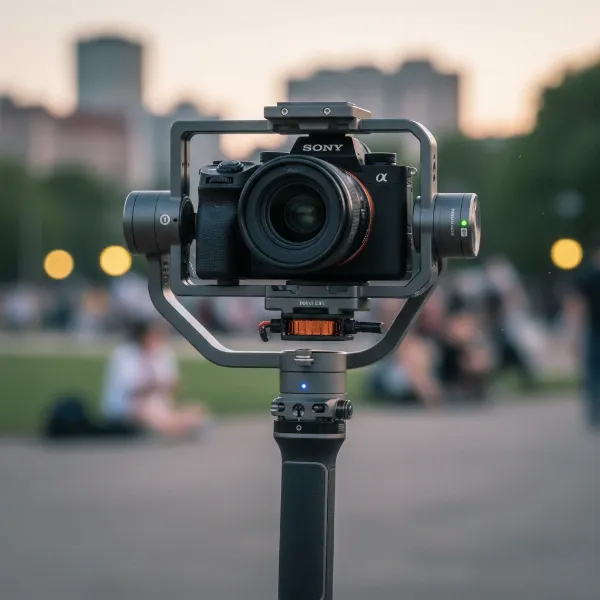 A professional mechanical gimbal stabilizing a mirrorless camera for smooth video.
Disadvantages of Mechanical Gimbals
Despite their superior performance, mechanical gimbals come with certain drawbacks. They can be expensive, particularly high-end models designed for professional cinema cameras. Gimbals also add significant weight and bulk to your gear, potentially causing fatigue during long shoots. A notable learning curve is often involved, as operators need to master balancing the camera and executing smooth movements. Battery life can be a concern, as the motors continuously draw power. Setting up and balancing a gimbal can also be time-consuming, and switching lenses often requires re-balancing.
Electronic Image Stabilization (EIS): The Software Solution
Electronic Image Stabilization (EIS) is a software-based technique that relies on digital processing to smooth out shaky footage. This method is predominantly found in compact devices where physical stabilization mechanisms are impractical.
How EIS Works
EIS operates by analyzing the video frames in real-time, or sometimes after capture, to detect unwanted movements. Using data from the camera’s internal motion sensors, such as gyroscopes and accelerometers, the software identifies how the image is shifting. To compensate, EIS digitally crops the edges of the frame and then intelligently shifts or repositions the usable portion of the image to counteract the detected shake. The “buffer” created by cropping allows the software to move the image around within the sensor’s capture area, presenting a more stable output.
Advantages of EIS
The primary advantages of EIS lie in its portability and convenience. Integrated directly into devices like smartphones, action cameras, and drones, EIS requires no additional hardware, making your setup lightweight and easy to carry. It’s a highly cost-effective solution as it leverages existing hardware and software. EIS is also more power-efficient compared to motorized gimbals since it doesn’t rely on continuously operating physical motors. For casual shooting, vlogging, and “run-and-gun” scenarios, EIS offers a simple, automatic way to improve video stability on the go.
 A person holding a smartphone, indicating electronic image stabilization for stable video.
Disadvantages of EIS
A significant drawback of EIS is the slight reduction in the field of view (FOV) due to the digital cropping required for stabilization. This means your footage will be slightly zoomed in compared to the original capture. In some cases, especially with more aggressive stabilization, EIS can lead to a “jello” or “wobbly” effect, where straight lines appear distorted. It may also result in a minor loss of image quality or detail, particularly in low-light conditions or when heavy cropping is applied. EIS is generally less effective than mechanical gimbals for very aggressive movements or in situations where extreme camera shake occurs.
Mechanical Gimbal vs. Electronic Stabilization: A Side-by-Side Comparison
To help you make an informed decision, here’s a direct comparison of mechanical gimbals and electronic image stabilization:
| Feature | Mechanical Gimbal (Motorized) | Electronic Image Stabilization (EIS) |
|---|---|---|
| Mechanism | Physical motors and sensors stabilize the camera in real-time | Software algorithms digitally crop and shift frames |
| Stability | Superior, handles significant shakes, cinematic smoothness | Good for minor shakes, integrated, can have “jello” effect |
| Portability | Bulky, heavy, requires setup | Highly portable, lightweight, integrated |
| Battery Life | Shorter due to continuous motor operation | More power-efficient, uses less energy |
| Image Quality | Preserves original quality and field of view | May reduce FOV (cropping), potential detail loss |
| Cost | Generally higher (separate equipment) | Lower (built into devices) |
| Learning Curve | Moderate to high (balancing, operation skills) | Low (automatic) |
| Best Use | Professional film, heavy cameras, planned shots | Vlogging, action cameras, smartphones, casual use |
Choosing the Right Stabilization for Your Needs
Deciding between a mechanical gimbal and electronic stabilization ultimately depends on your specific camera gear, shooting style, budget, and desired outcome.
Consider Your Camera Gear
If you primarily shoot with a DSLR, mirrorless camera, or a professional cinema camera, a mechanical gimbal is typically the superior choice. It’s designed to handle the weight and balance of these larger setups, providing the robust stability they require. For smartphone users, action camera enthusiasts, or drone pilots, EIS is often the default and highly effective solution, given the compact nature and integrated capabilities of these devices.
Define Your Shooting Style & Purpose
Think about the type of content you create and how you typically move the camera. If you aim for professional-grade, cinematic footage with deliberate camera movements, or if you frequently work in challenging environments where significant camera shake is unavoidable, a mechanical gimbal will deliver the best results. For run-and-gun videography, travel vlogs, or spontaneous action shots where mobility and quick deployment are key, EIS offers a fantastic balance of convenience and performance.
Evaluate Your Budget & Willingness to Learn
Mechanical gimbals represent a more significant investment, not just in terms of upfront cost but also in the time and effort required to master their operation. If you have a flexible budget and are committed to honing your videography skills for the highest level of stability, a gimbal is worthwhile. If you’re on a tighter budget, prefer a simpler “point-and-shoot” experience, and prioritize ease of use, then relying on your camera’s built-in EIS or a device that heavily features it might be the more practical choice.
Expert Advice: Combining Technologies for Ultimate Smoothness
While mechanical gimbals and EIS are distinct technologies, they aren’t always mutually exclusive. In fact, combining different forms of stabilization can often lead to the most polished results. Many modern cameras feature in-camera optical image stabilization (OIS), a hardware-based lens or sensor shift system that works alongside electronic stabilization. When an OIS-equipped camera is mounted on a mechanical gimbal, the combined effect can mitigate an even wider range of shakes, from large body movements to micro-jitters, yielding exceptionally stable footage.
“For the ultimate in smooth video, don’t be afraid to stack your stabilization. A robust mechanical gimbal paired with in-camera optical stabilization can create a truly professional, ethereal look.” – Alex Chen, Professional Cinematographer and Camera Stabilization Specialist
This layered approach maximizes your ability to capture fluid, shake-free video, giving you greater creative freedom and ensuring your content stands out.
Buying Guide: Lời khuyên từ chuyên gia
When venturing into the world of Camera Stabilizers, making an informed decision is key to unlocking your full creative potential. First and foremost, clearly define your needs and shooting purpose. Are you filming dynamic action sequences, cinematic narratives, or casual vlogs? Your primary use case will heavily influence the type of stabilization that’s most suitable. Next, thoroughly read reviews and compare products. Look for real-world tests and user feedback that align with your intended use. Pay close attention to factors like battery life, weight, ease of balancing, and the specific stabilization axes offered. Finally, always inquire about warranty and support policies. A reliable warranty provides peace of mind, especially for electronic devices, and knowing that expert support is available can be invaluable as you learn and grow with your new equipment.
Frequently Asked Questions
Can I use a mechanical gimbal and electronic image stabilization (EIS) at the same time?
Yes, many videographers combine a mechanical gimbal with a camera that has built-in EIS or optical image stabilization (OIS). This layering of stabilization technologies can lead to even smoother footage, as the gimbal handles the major movements while the in-camera stabilization refines micro-jitters, creating an exceptionally stable final image.
Does electronic image stabilization (EIS) always crop my video?
Generally, yes. EIS works by digitally shifting the image within a larger captured frame, and this “buffer zone” around the edges requires a slight crop to prevent seeing the raw, unstabilized edges of the sensor’s capture area. The extent of the crop varies by camera and the intensity of the stabilization applied, but some reduction in the field of view is usually expected.
Which is better for low-light situations, a gimbal or EIS?
A mechanical gimbal is generally better in low-light conditions because it physically stabilizes the camera, allowing for slower shutter speeds without introducing motion blur. EIS, being software-based, often involves digital processing that can introduce noise or artifacts when cropping and shifting frames in dim lighting, potentially degrading image quality more noticeably.
Are traditional steadicams considered mechanical gimbals?
While both aim for mechanical stabilization, traditional steadicams rely on counterweights and a complex harness system to achieve smooth, floating shots without motors. Modern “mechanical gimbals” are motorized, actively correcting motion with electronic components. The term “mechanical gimbal” in this article primarily refers to these motorized electronic gimbals, though traditional steadicams are also a form of mechanical stabilization.
How much practice does it take to get good with a mechanical gimbal?
Mastering a mechanical gimbal requires significant practice. Learning to balance your camera correctly, execute fluid movements, and operate the gimbal’s various modes takes time and dedication. While initial setup might be quick for some, achieving professional-level, seamless footage often requires weeks or even months of consistent practice.